You send an email campaign expecting it to reach hundreds or thousands of people. Instead, you check the campaign report and discover that a surprising number of emails bounced.
A few bounces are normal. But if your bounce rate is consistently high, something needs attention.
Invalid addresses, outdated lists, temporary delivery problems, poor list hygiene, and risky contacts can all contribute to email bounces. If the problem continues, it can also affect your email deliverability and sender reputation.
The good news is that most bounce problems can be identified and fixed.
In a Hurry? Here’s What to Do
Emails bouncing? Don’t keep sending to bad addresses.
The most common causes are invalid or outdated email addresses, temporary server problems, poor list hygiene, and risky contacts. Before your next campaign, verify your email list and remove addresses confirmed as invalid.
Validate your first 100 email addresses for free + use code HAFSA10 for 10% off paid plans.
What Is an Email Bounce?
An email bounce occurs when your message cannot be delivered to the recipient.
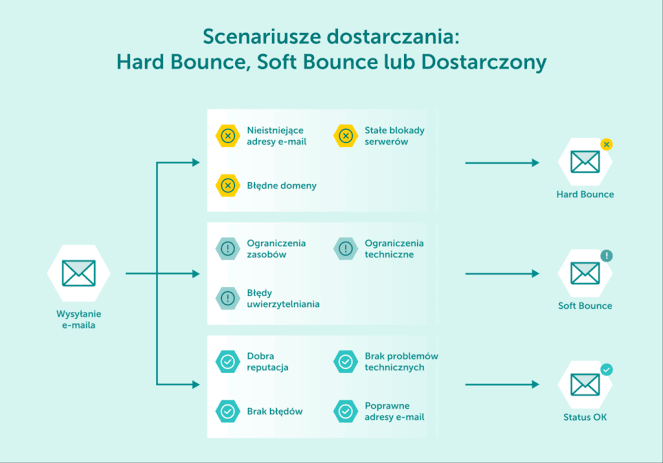
There are two main types of email bounces: hard bounces and soft bounces.
Hard Bounce
A hard bounce is a permanent delivery failure.
Common causes include:
The email address doesn’t exist.
The mailbox has been deleted.
The domain doesn’t exist.
The recipient address is permanently invalid.
You generally shouldn’t continue sending emails to hard-bounced addresses.
Soft Bounce
A soft bounce is usually temporary.
It can happen when:
The recipient’s inbox is full.
The receiving server is temporarily unavailable.
The message is temporarily rejected.
The email is too large.
A soft bounce doesn’t automatically mean the email address is invalid.
Soft bounce v/s Hard bounce
9 Common Reasons Your Emails Are Bouncing
1. The Email Address Doesn’t Exist
One of the most common causes of hard bounces is an email address that simply doesn’t exist anymore.
A subscriber may have:
Deleted their account.
Changed email providers.
Left a company.
Provided a fake address.
Used an address that was already inactive.
If the mailbox doesn’t exist, your email cannot be delivered.
How to fix it
Verify your email list before sending and remove addresses confirmed as invalid.
2. Someone Made a Typing Mistake
A small spelling mistake can turn a valid email into an undeliverable one.
For example:
gmial.com instead of gmail.com
yahooo.com instead of yahoo.com
outlok.com instead of outlook.com
The address may look legitimate at first glance, but the receiving domain may not exist.
How to fix it
Use email validation during signup and verify your existing database regularly.
This is especially useful if you’re collecting addresses through forms where users manually type their information.
3. Your Email List Is Outdated
An email address that worked two years ago isn’t necessarily valid today.
People change jobs, abandon old inboxes, close accounts, or switch email providers.
This is particularly common with business email addresses.
For example, someone who subscribed using a company email may leave that company months later. Their old address may eventually stop working.
How to fix it
Don’t assume an old database is still accurate.
Periodically verify your list, especially before sending a large campaign.
4. The Recipient’s Mailbox Is Full
Sometimes the recipient’s email address is completely valid, but their mailbox can’t accept any more messages.
This can produce a soft bounce.
The problem may disappear once the recipient clears space from their inbox.
How to fix it
Don’t immediately delete every address that produces a soft bounce.
Monitor repeated delivery failures and distinguish temporary problems from permanent ones.
5. The Receiving Mail Server Is Temporarily Unavailable
The recipient’s email server may occasionally experience:
Technical problems
Temporary downtime
Heavy traffic
Connection issues
When this happens, the receiving server may reject the message temporarily.
How to fix it
Check the bounce message and determine whether the failure is temporary.
Your email provider may automatically retry delivery, so a temporary bounce doesn’t necessarily require you to delete the subscriber.
6. You’re Sending to Disposable or Risky Email Addresses
Some people use temporary or disposable email addresses when signing up for websites and services.
These addresses may only exist for a short period.
Other risky addresses can include:
Abuse addresses
Spam traps
Catch-all addresses
Temporary email accounts
These contacts can lower the overall quality of your database.
How to fix it
Verify your email list before sending.
This allows you to identify risky addresses and decide whether they should receive your campaign.
7. Your Email Authentication Has Problems
Not every email delivery problem is caused by your subscriber list.
Your domain configuration also matters.
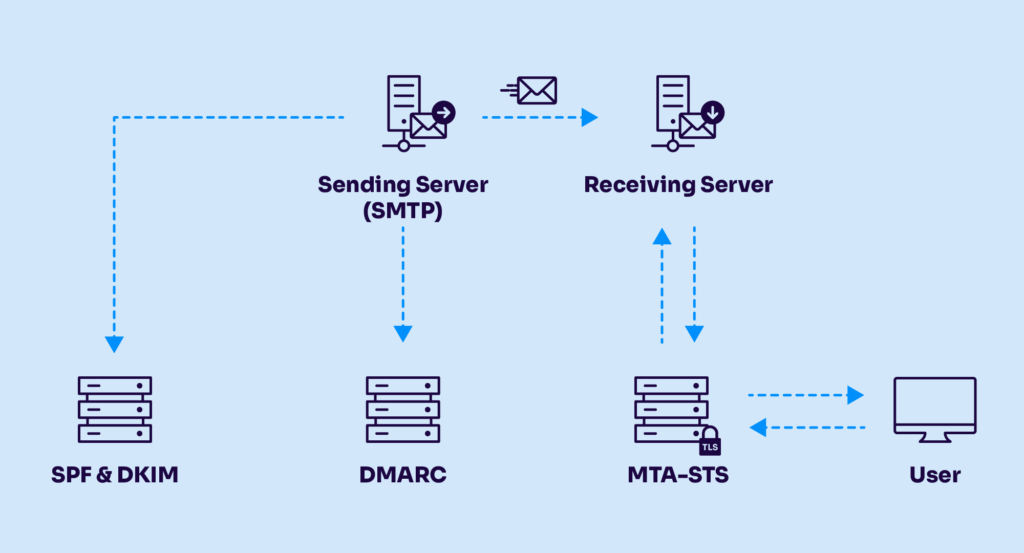
Make sure your sending domain is properly configured with:
SPF
DKIM
DMARC
These authentication standards help receiving mail systems verify that your emails are legitimately associated with your domain.
Email passing through SPF DKIM DMARK before reaching to the user’s inbox
8. Your Sender Reputation Is Poor
Your sending history affects how mailbox providers treat your emails.
If you repeatedly:
Send to invalid addresses
Generate spam complaints
Use purchased email lists
Ignore bounce reports
your sender reputation can suffer.
A poor reputation can make it harder for future emails to reach the inbox.
How to fix it
Start with your email list.
Remove invalid contacts, stop sending to purchased lists, authenticate your domain, and monitor your bounce and complaint rates.
9. Your List Contains Spam Traps
Spam traps are email addresses used by anti-spam organizations and mailbox providers to identify questionable sending practices.
They aren’t normal subscribers waiting to receive your marketing emails.
Spam traps can enter databases through:
Purchased email lists
Scraped addresses
Poor collection practices
Neglected old databases
How to fix it
Build your list through legitimate, permission-based methods and verify your database regularly.
How to Find Out Why Your Emails Are Bouncing
Your email marketing platform should provide bounce information after a campaign.
Look for:
Total bounced emails
Hard bounces
Soft bounces
Bounce percentage
Delivery error messages
Don’t focus only on the overall percentage.
You need to understand why the emails failed.
For example:
Mostly hard bounces? Your list may contain too many invalid or outdated addresses.
Mostly soft bounces? The problem may be temporary mailbox or server issues.
Sudden spike after importing a new list? The newly imported contacts may need verification.
How to Reduce Your Email Bounce Rate
Once you know what’s causing your bounces, you can take steps to prevent them.
Verify Your Email List Before Sending
Instead of discovering bad addresses after your campaign, identify them beforehand.
Email verification can help detect:
Invalid addresses
Disposable emails
Abuse addresses
Spam traps
Catch-all domains
Other risky contacts
This allows you to remove or separate problematic addresses before sending.
Verify New Subscribers at Signup
Don’t wait until your database contains thousands of contacts before checking its quality.
Verifying addresses when people sign up can prevent invalid or risky contacts from entering your database in the first place.
This is particularly useful for businesses collecting leads through online forms.
Remove Hard-Bounced Addresses
A hard bounce generally indicates a permanent delivery problem.
Continuing to send campaigns to these addresses won’t make them deliverable.
Remove them from future campaigns according to your email platform’s suppression practices.
Don’t Buy Email Lists
A large email list isn’t necessarily a valuable email list.
Purchased databases can contain:
Invalid addresses
Outdated contacts
Spam traps
Disposable accounts
People who never consented to receive your emails
Building a permission-based list is safer and more sustainable.
How ZeroBounce Can Help
If you’re managing hundreds or thousands of email addresses, manually checking each one isn’t practical.
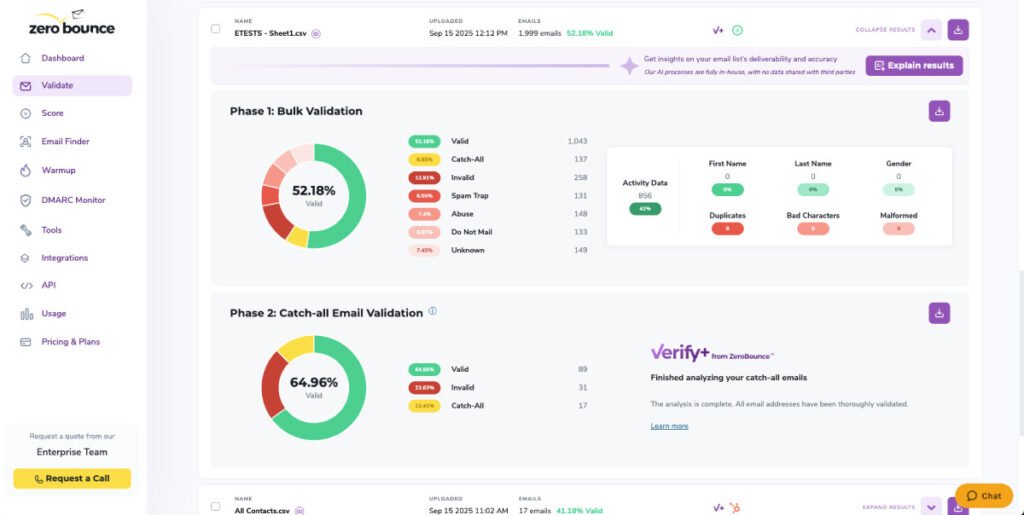
ZeroBounce provides automated email verification to help identify problematic addresses before you send your campaign.
It can identify categories such as:
Invalid emails
Disposable emails
Abuse addresses
Spam traps
Catch-all domains
Other risky contacts
That makes it particularly useful before large campaigns or when you’re working with an older email database.
Instead of waiting for your email platform to tell you that hundreds of messages bounced, you can check the list beforehand and remove problematic addresses proactively.
zerobounce Dashboard
Why verify before you send?
Cleaning your list before a campaign is generally better than discovering hundreds of bad addresses afterward. It can help reduce avoidable bounces and protect the overall quality of your database.
What Not to Do When Your Bounce Rate Is High
When marketers notice a high bounce rate, they sometimes make the problem worse.
Avoid these mistakes:
Don’t repeatedly send to hard-bounced addresses
A permanently invalid address won’t become deliverable because you keep trying.
Don’t buy another email list
Adding another low-quality database can increase the problem.
Don’t ignore bounce reports
Your campaign reports can tell you whether the problem is temporary or permanent.
Don’t delete every bounced address immediately
A soft bounce may be temporary, so distinguish it from a permanent hard bounce.
Don’t assume your email provider is the problem
Your provider may be working normally while your database contains outdated or invalid addresses.
Frequently Asked Questions
Why are my emails suddenly bouncing?
A sudden increase may be caused by an outdated or recently imported list, a large number of invalid addresses, authentication problems, or temporary receiving-server issues.
Compare the affected campaign with previous campaigns and check the bounce categories.
How do I fix a high email bounce rate?
Start by identifying whether you’re dealing with hard or soft bounces. Remove invalid hard-bounced addresses, verify your remaining list, avoid purchased databases, and check your email authentication.
Can email verification prevent bounces?
Email verification can significantly reduce avoidable bounces caused by invalid or risky addresses. However, no verification service can guarantee that every email will always be delivered because mailboxes and domains can change.
Should I remove soft-bounced emails?
Not necessarily. Soft bounces are often temporary. Monitor repeated soft bounces and follow your email platform’s recommended suppression practices.
How often should I verify my email list?
For established lists, periodic verification every few months is a reasonable starting point. New addresses can also be verified when they enter your database, particularly if you’re collecting large numbers of leads.
Final Thoughts
A high bounce rate isn’t something you should simply accept as part of email marketing.
The first step is finding out why your emails are bouncing.
If you’re dealing with invalid addresses, outdated contacts, disposable emails, or other risky addresses, verifying your list before sending can prevent many problems before they affect your campaign.
If your list is healthy, investigate other factors such as authentication, sender reputation, and receiving-server errors.
The goal isn’t simply to send more emails.
It’s to send more emails that actually reach real inboxes.

Pingback: Bulk Email Address Validation: How to Validate Emails in Large Lists - InsightsVaultHQ