
Spam traps are one of the biggest threats to your email deliverability—and the worst part is that you usually don’t know they’re on your list until the damage has already been done.
Unlike invalid email addresses that simply bounce, spam traps can silently damage your sender reputation, causing more of your future emails to land in spam folders.
If you want to protect your email marketing, removing spam traps should be part of your regular email list hygiene.
Protect Your Email Reputation with ZeroBounce
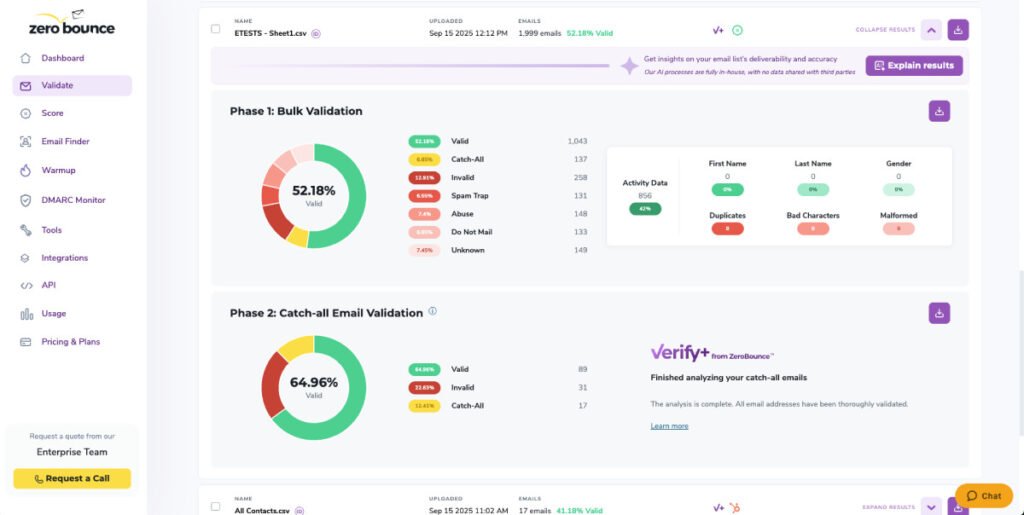
ZeroBounce helps identify spam traps along with other risky email addresses such as invalid, disposable, abuse, and catch-all emails. Verifying your email list before every campaign reduces the risk of sending to addresses that could hurt your sender reputation.
Use coupon code HAFSA10 to get 10% off paid plans.
What Is a Spam Trap?
A spam trap is an email address used by mailbox providers and anti-spam organizations to identify senders with poor email marketing practices.
These addresses are not intended for normal communication.
If you’re sending emails to spam traps, it’s often a sign that your email list is outdated, poorly maintained, or contains contacts that never gave permission to receive your emails.
Types of Spam Traps
Understanding the different types of spam traps helps you avoid them.
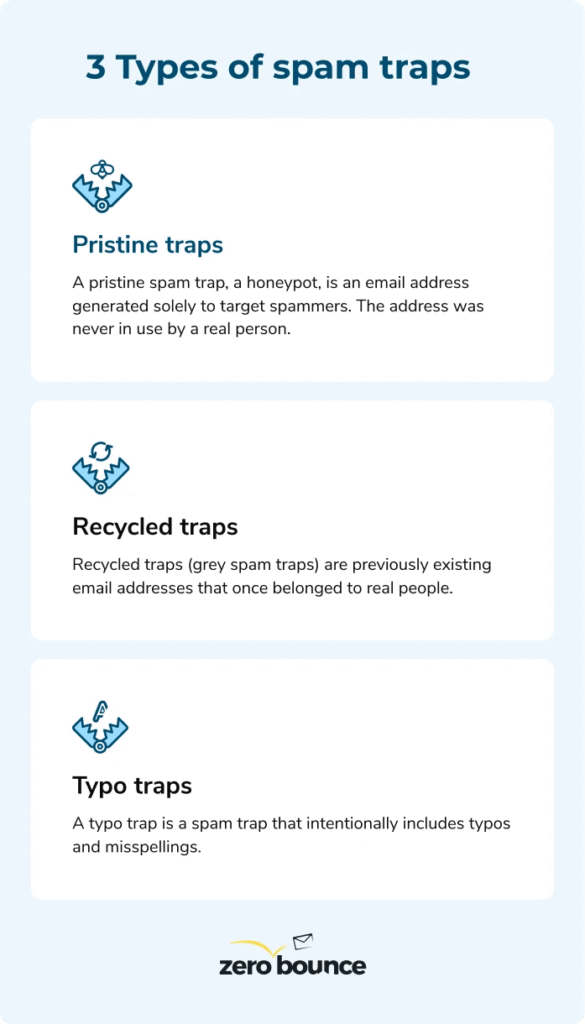
Pristine Spam Traps
These email addresses have never belonged to a real person.
They exist solely to identify senders who collect email addresses improperly, such as through web scraping or purchased lists.
If you send emails to pristine spam traps, it’s a strong indication that your list was not built using permission-based methods.
Recycled Spam Traps
These are email addresses that once belonged to real users but were abandoned.
After remaining inactive for a long period, mailbox providers may reactivate them as spam traps.
If your email list hasn’t been cleaned in months or years, recycled spam traps become much more likely.
Typo Spam Traps
Sometimes people accidentally type an email address incorrectly.
For example:
- gmail.com
- yahooo.com
- hotmail.com
Some of these mistyped domains are monitored to identify senders who fail to validate email addresses before sending.
How Spam Traps Hurt Your Business
Sending emails to spam traps can lead to serious consequences.
1. Lower Sender Reputation
Mailbox providers use spam trap hits as a strong signal that your email practices need improvement.
A damaged sender reputation makes it harder for future emails to reach the inbox.
2. More Emails Go to Spam
As trust decreases, mailbox providers become more likely to place your campaigns in spam folders—even for subscribers who want your emails.
3. Lower Campaign Performance
Poor inbox placement results in:
- Lower open rates
- Fewer clicks
- Reduced conversions
- Lost revenue
Even excellent email content can’t perform well if recipients never see it.
4. Potential Account Reviews
Some email service providers monitor bounce rates and spam complaints. Repeated signs of poor list quality—including spam trap hits—may trigger reviews or restrictions under their acceptable use policies.
How Spam Traps End Up on Your Email List
Most businesses don’t intentionally collect spam traps.
They usually appear because of:
- Old email databases
- Purchased email lists
- Scraped email addresses
- Poor signup validation
- Failure to remove inactive contacts
- Never cleaning the mailing list
The older your list becomes, the greater the chance that recycled spam traps have entered it.
How to Remove Spam Traps
1. Verify Your Email List Regularly
Email verification is one of the most effective ways to identify risky addresses before you send.
It also helps detect:
- Invalid emails
- Disposable emails
- Abuse accounts
- Catch-all domains
Regular verification reduces the chances of sending to spam traps.
2. Never Buy Email Lists
Purchased email lists are one of the biggest sources of spam traps.
Even if the seller claims the list is “verified,” you have no way of knowing how those email addresses were collected.
Building your own permission-based list is much safer.
3. Remove Hard-Bounced Addresses
Hard bounces often indicate outdated or invalid contacts.
Removing them promptly improves overall list quality and reduces future risks.
4. Use Double Opt-In
Double opt-in requires subscribers to confirm their email address before joining your list.
Benefits include:
- Fewer fake registrations
- Better-quality subscribers
- Reduced typing mistakes
- Stronger engagement
5. Clean Your List Frequently
Email databases naturally decay over time.
People:
- Leave companies.
- Delete email accounts.
- Stop using old inboxes.
Regular maintenance prevents outdated addresses from becoming a deliverability problem.
How ZeroBounce Helps
ZeroBounce helps businesses improve email list quality before campaigns are sent.
Its verification process identifies:
- Invalid email addresses
- Disposable email accounts
- Spam traps
- Abuse emails
- Catch-all domains
- Other risky contacts
By removing these addresses proactively, you reduce the risk of damaging your sender reputation and improve your chances of reaching the inbox.
Frequently Asked Questions
Can I manually identify spam traps?
No. Spam traps are intentionally designed to be difficult to recognize manually. Email verification services use advanced checks to help identify risky addresses.
Do spam traps always bounce?
No. Many spam traps accept emails without bouncing, which is why they can be more dangerous than ordinary invalid email addresses.
How often should I verify my email list?
Verify new subscribers as they join your list and clean your existing database every few months or before major campaigns.
Is buying an email list worth the risk?
No. Purchased email lists often contain outdated addresses, invalid contacts, and spam traps, which can damage your sender reputation and reduce deliverability.
Final Thoughts
Spam traps are invisible threats that can quietly undermine your email marketing efforts. Once your sender reputation is damaged, recovering your inbox placement becomes much more difficult.
The best defense is prevention. Build your list ethically, clean it regularly, and verify your contacts before every major campaign.
A healthier email list leads to better deliverability, stronger engagement, and more successful email marketing.
Coupon Code: HAFSA10 — Get 10% off paid plans.
Pingback: Email List Hygiene Checklist: 10 Steps to Better Deliverability - InsightsVaultHQ