
Sending an email campaign to thousands of contacts without checking whether the addresses are still valid can create problems before your campaign even begins.
Some addresses may no longer exist. Others may contain typos, belong to temporary inboxes, or have become inactive since you collected them. When too many messages are sent to undeliverable addresses, bounce rates can rise and your sender reputation may eventually suffer.
This is where bulk email address validation becomes important.
Instead of checking email addresses one by one, bulk validation allows you to upload a large email list and identify addresses that may be safe, invalid, risky, or require additional attention before you send a campaign.
Validate your first 100 emails for free with ZeroBounce — get 10% off with code HAFSA10.
In this guide, you’ll learn how bulk email validation works, how to validate large email lists, what different validation results mean, and how to use the results to maintain a healthier email database.
What Is Bulk Email Address Validation?
Bulk email address validation is the process of checking a large number of email addresses at once to determine whether they appear deliverable and to identify potentially problematic addresses.
Instead of manually reviewing individual contacts, you upload or submit a list containing hundreds, thousands, or even more email addresses.
The validation process can check different signals associated with an address, such as:
- Whether the email format is valid
- Whether the domain exists
- Whether the domain can receive email
- Whether the mailbox appears deliverable
- Whether the address is disposable
- Whether the address belongs to a catch-all domain
- Whether the address may carry additional risk
The exact information available depends on the email validation provider and the type of address being checked.
For businesses managing large databases, bulk validation can be significantly more practical than waiting to discover bad addresses through email bounces.
Why Should You Validate Email Addresses in Bulk?
Email lists do not remain accurate forever.
A contact that was valid when it entered your database may later become unusable because the person:
- Changed jobs
- Left a company
- Closed their email account
- Switched to another provider
- Used a temporary email address
- Entered the wrong address during signup
This is especially common with B2B lists.
An employee’s professional email address may become invalid as soon as they leave an organization. If that address remains in your database for months or years, sending to it later can increase your campaign’s bounce rate.
Bulk email validation helps you identify potential problems before sending rather than after receiving bounce notifications.
This makes it particularly useful before:
- Large email campaigns
- Newsletter sends
- Cold outreach campaigns
- Re-engagement campaigns
- CRM migrations
- Database imports
- Major product launches
If you’re also struggling with increasing bounces, this topic connects closely with Why Are My Emails Bouncing? 9 Common Causes and How to Fix Them, which explains the different reasons messages fail to reach recipients.
How Does Bulk Email Validation Work?
Bulk email validation is more than checking whether an address contains an @ symbol.
A professional email validation process can involve several checks designed to determine whether an address is likely to be usable.
1. Syntax Check
The first step is checking whether the email follows a valid format.
For example, an address may be flagged if it:
- Is missing the
@symbol - Has an incomplete domain
- Contains invalid formatting
- Includes obvious structural errors
However, a correctly formatted address is not automatically a valid or active mailbox.
For example:
john@example.com
may have a technically correct format even if the mailbox itself no longer exists.
That is why additional checks are necessary.
2. Domain Check
The validation process can examine whether the domain associated with the email address exists.
For example:
person@company.com
The system checks whether company.com is a functioning domain.
If the domain no longer exists or cannot be resolved, the email address may not be deliverable.
This step can help identify addresses associated with:
- Expired domains
- Misspelled company domains
- Non-existent domains
3. Mail Server Check
A valid domain does not necessarily mean that it is configured to receive email.
Bulk validation can also check the domain’s mail server configuration to determine whether it appears capable of receiving messages.
This helps separate:
- Domains that exist but do not accept email
- Domains that appear correctly configured for email
- Domains with potential technical problems
4. Mailbox-Level Verification
Depending on the address and the validation system, additional checks may help determine whether the mailbox itself appears capable of receiving email.
This is one of the most valuable stages because an address can have:
- Correct syntax
- A valid domain
- A functioning mail server
while the individual mailbox itself no longer exists.
Mailbox-level checks can help identify addresses that are more likely to generate bounces if included in a campaign.
What Types of Email Addresses Can Bulk Validation Identify?
When you validate a large list, you may receive multiple categories of results.
These categories are important because not every address should necessarily be handled in the same way.
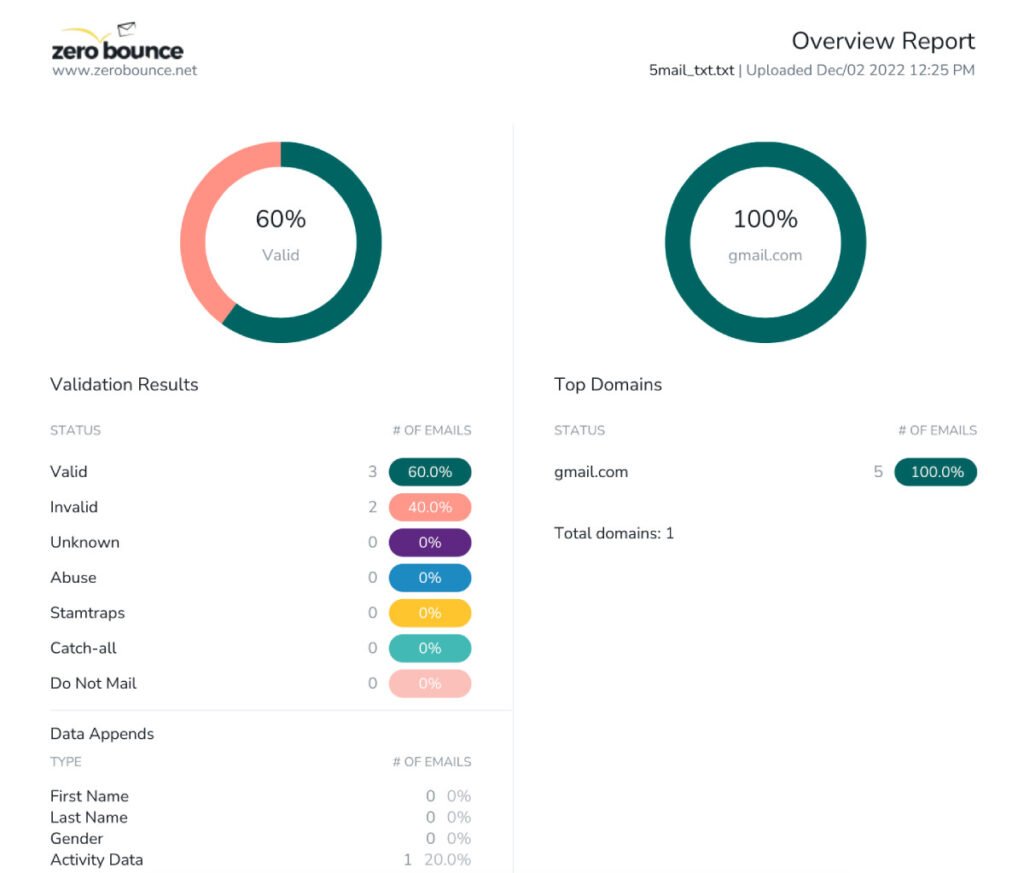
Valid Addresses
These are addresses that pass the validation process and appear suitable for sending, based on the available checks.
Valid addresses can form the foundation of your active sending list.
However, validation does not guarantee that every recipient will open, engage with, or respond to your email.
Deliverability and engagement are separate issues.
Invalid Addresses
Invalid addresses are those that appear undeliverable.
Common reasons include:
- The mailbox does not exist
- The domain does not exist
- The address contains serious errors
- The receiving domain cannot accept email
These addresses should generally not remain in your regular sending campaigns.
Continuing to send messages to clearly invalid addresses can create unnecessary bounces.
This is also why bulk validation works well alongside the strategy discussed in How to Reduce Email Bounce Rate: 10 Proven Ways to Stop Emails From Bouncing.
Disposable Email Addresses
Disposable addresses are temporary email accounts created for short-term use.
People may use them to:
- Access a free download
- Sign up for a service
- Avoid receiving future marketing messages
- Protect their primary inbox
Whether you should remove disposable addresses depends on your business and campaign goals.
For example, a disposable address may technically receive your email but still provide little long-term value for building a customer relationship.
Catch-All Addresses
Catch-all domains are more complicated.
A catch-all domain can be configured to accept messages sent to almost any address associated with that domain.
For example, a message sent to:
randomname@company.com
might be accepted even if that specific mailbox does not exist.
This makes it difficult to determine with complete certainty whether an individual address is actively monitored.
Catch-all addresses should usually be reviewed separately rather than automatically treated exactly like confirmed valid addresses.
Spam-Trap and Abuse-Risk Addresses
Certain addresses can carry additional risks for email senders.
Some may be associated with abuse complaints, while others may present risks depending on how the address was collected and maintained.
This is one reason bulk validation is particularly valuable for old or externally acquired lists.
A list can contain thousands of addresses that look legitimate at first glance but may not be appropriate for continued marketing or outreach.
How to Validate Emails in Large Lists
The process of validating a bulk email list is relatively straightforward, but what you do before and after validation matters just as much as the upload itself.
Step 1: Prepare Your Email List
Start by exporting the contacts you want to validate.
Before uploading, make sure your list is reasonably organized.
Depending on the service, you may be able to upload common file formats containing one or more columns.
It is useful to remove obvious duplicates before validation so you are not processing the same address repeatedly.
You should also make sure the email column is clearly labeled and contains only the information needed for validation.
Before uploading, check for:
- Duplicate email addresses
- Empty rows
- Incorrect formatting
- Unnecessary columns
- Obvious data-entry errors
A clean file makes the validation process easier to manage.
Step 2: Upload Your List to a Bulk Email Validation Tool
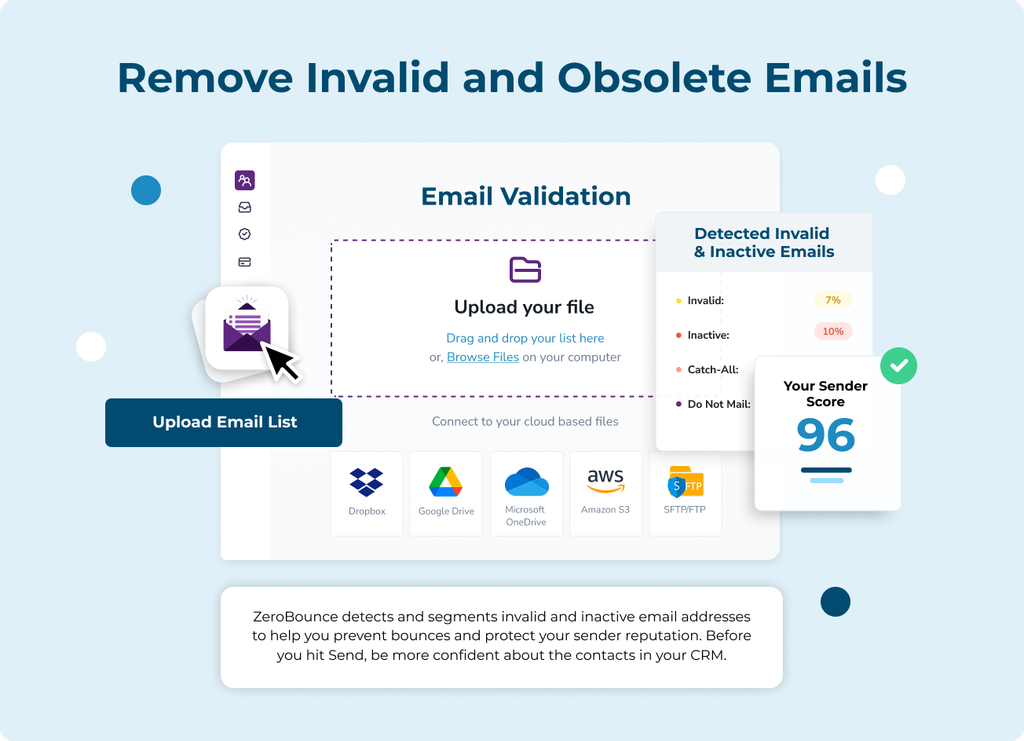
Once your file is ready, upload the email addresses to your chosen validation service.
For example, ZeroBounce allows users to validate email lists in bulk and receive results that categorize addresses based on their validation status.
The benefit of using a dedicated bulk validator is that you can process a large database much more efficiently than manually checking individual addresses.
For businesses that regularly manage new leads, customer databases, or outreach lists, this can become part of the normal list-management workflow.
Validate your first 100 emails for free with ZeroBounce — get 10% off with code HAFSA10.
Step 3: Wait for the Validation Results
After processing, your list should return with information about the status of your addresses.
Do not make the mistake of treating every result as simply:
Keep or delete.
A better approach is to understand the categories.
For example:
| Validation result | Recommended action |
|---|---|
| Valid | Keep for appropriate campaigns |
| Invalid | Remove or suppress from sending |
| Disposable | Review based on campaign goals |
| Catch-all | Handle carefully and consider risk |
| Abuse or other risky category | Avoid sending unless appropriately reviewed |
The exact categories can vary depending on the validation provider.
The goal is to reduce unnecessary sending to addresses that could create bounces or other problems.
What Should You Do After Bulk Email Validation?
Uploading the list is only half of the process.
The real value comes from using the validation results correctly.
Remove Clearly Invalid Addresses
If an address has been identified as invalid, there is generally little reason to continue including it in future campaigns.
Keeping clearly invalid contacts on an active list increases the risk that they will eventually generate unnecessary bounces.
This is particularly important when your list contains contacts collected over several years.
Separate Risky Addresses
Not every address will fit neatly into a valid-or-invalid category.
Create separate segments for addresses that require additional attention.
For example:
- Catch-all addresses
- Disposable addresses
- Other uncertain categories
This gives you more control over your sending strategy.
You may decide to exclude certain categories from marketing campaigns while treating them differently for transactional or business communications.
Update Your Main Database
After reviewing the results, update your CRM or email marketing platform.
Do not simply clean a spreadsheet and then continue sending from an older database that still contains the same invalid contacts.
Your validation results should be reflected in the actual list you use for campaigns.
This is an important step in maintaining long-term email hygiene.
For a broader process, readers can also explore How to Clean an Email List for Better Deliverability: A Step-by-Step Guide, which focuses on turning validation data into a healthier sending database.
How Often Should You Validate a Large Email List?
There is no single schedule that works for every business.
The right frequency depends on:
- How quickly your list grows
- Whether you collect addresses daily
- How often you send campaigns
- Whether your contacts frequently change jobs
- How long addresses remain unused before campaigns
For example, a business collecting hundreds of new leads every week may benefit from frequent or real-time validation.
A business sending to an older database only occasionally should consider validating the list before major campaigns.
The most important principle is this:
Do not assume an email address will remain valid forever simply because it was valid once.
Email data naturally changes.
Regular validation can help you detect those changes before they affect campaign performance.
Bulk Email Validation vs. Email Verification
The terms email validation and email verification are often used interchangeably.
In practical marketing conversations, both generally refer to checking whether email addresses appear usable and identifying potentially problematic contacts.
However, different providers may use slightly different terminology for specific processes.
For businesses, the more important question is not the label.
It is understanding what the service actually checks and what information you receive after processing your list.
If you want a broader explanation of this topic, What Is Email Verification and Why Do You Need It? can help readers understand why checking email addresses has become an important part of email marketing and outreach.
Why Bulk Validation Is Important for Email Deliverability
Bulk email validation does not guarantee inbox placement.
A clean list is only one part of email deliverability.
Your inbox placement can also be influenced by:
- Sender reputation
- Authentication
- Spam complaints
- Recipient engagement
- Sending volume
- Email content
- Technical configuration
However, list quality is one of the areas you can directly control.
If your list contains a large number of invalid addresses, every campaign can produce unnecessary bounces.
Those bounces may eventually contribute to reputation problems.
That is why email validation and deliverability work together.
A clean list gives your campaigns a stronger starting point.
This connects closely with How to Improve Email Deliverability and Keep Your Emails Out of Spam, where list quality is one of several factors that can influence whether your emails successfully reach recipients.
Common Mistakes to Avoid When Validating Bulk Email Lists
1. Validating a List Once and Forgetting About It
A list can become outdated after validation.
New contacts can enter your database, while existing contacts can change jobs or abandon accounts.
Bulk validation should be part of an ongoing list-management process.
2. Automatically Treating Every Non-Valid Result the Same
Different categories can represent different situations.
An invalid address and a catch-all address are not necessarily the same.
Review the categories and decide how they fit your specific sending strategy.
3. Continuing to Send From an Old Copy of Your List
You may validate a new spreadsheet but forget to update your email marketing platform.
This leaves the invalid contacts active.
Always make sure the cleaned results are reflected in the database you actually use.
4. Waiting Until Bounce Rates Become a Serious Problem
Bulk validation works best as a preventative process.
If you wait until your bounce rate has already increased significantly, the problematic addresses may have already affected multiple campaigns.
Validate important lists before sending rather than using bounces as your primary method of identifying bad addresses.
5. Assuming Validation Solves Every Deliverability Problem
A clean email list is important, but it does not automatically solve:
- Poor sender reputation
- Authentication problems
- Spam complaints
- Low engagement
- Infrastructure issues
Bulk validation should be one part of a broader deliverability strategy.
If your addresses are valid but your emails still struggle to reach recipients, Why Are My Emails Going to Spam? 12 Reasons and How to Fix It can help you investigate other potential causes.
A Simple Bulk Email Validation Workflow
If you regularly send campaigns to large lists, use a repeatable process.
Before the campaign
- Export the relevant contacts.
- Remove obvious duplicates.
- Validate the email addresses.
- Review the validation results.
After validation
- Remove or suppress invalid addresses.
- Separate risky categories.
- Update your main database.
- Build your campaign from the cleaned list.
After sending
- Monitor bounce rates.
- Review unusual delivery problems.
- Track changes in sender reputation.
- Continue maintaining your database.
This approach makes bulk validation part of your normal email workflow rather than something you only do after deliverability problems appear.
Frequently Asked Questions
Can I validate thousands of email addresses at once?
Yes. Bulk email validation services are designed to process large lists rather than requiring you to check each address individually.
The number of addresses you can process may depend on the provider and your available credits or plan.
Is bulk email validation accurate?
Validation services use multiple checks to assess email addresses, but no provider can guarantee that every email will remain deliverable forever.
Email addresses can change after validation, and some address types, such as catch-all domains, are more difficult to classify with complete certainty.
Should I delete every address that is not marked valid?
Not necessarily.
Different validation categories can require different actions.
Clearly invalid addresses should generally be removed or suppressed, while categories such as catch-all addresses may require a more careful decision.
Can bulk email validation reduce bounce rates?
Yes. Identifying invalid addresses before sending can reduce avoidable bounces.
However, temporary server problems and other delivery issues can still cause some emails to bounce.
Should I validate my email list before every campaign?
The ideal schedule depends on how often your list changes.
For old, inactive, or newly imported lists, validation before sending is particularly important.
Businesses collecting new contacts continuously may benefit from validating addresses regularly or in real time.
Final Thoughts
Bulk email address validation is one of the simplest ways to gain more control over the quality of a large email database.
Instead of discovering invalid addresses only after your campaign produces bounces, you can identify potentially problematic contacts before you send.
The process is straightforward:
Prepare your list → Validate addresses → Review the results → Remove invalid contacts → Update your database → Send to a cleaner list.
For businesses managing thousands of contacts, this can save more than wasted email sends.
Maintaining a healthier database can also help support lower bounce rates and stronger long-term deliverability.
The most important thing is consistency. Email lists naturally change, so bulk validation should not be viewed as a one-time cleanup. Make it part of your regular email marketing workflow and you’ll be in a much stronger position before every major campaign.