
Every invalid email address on your list costs you more than a failed delivery.
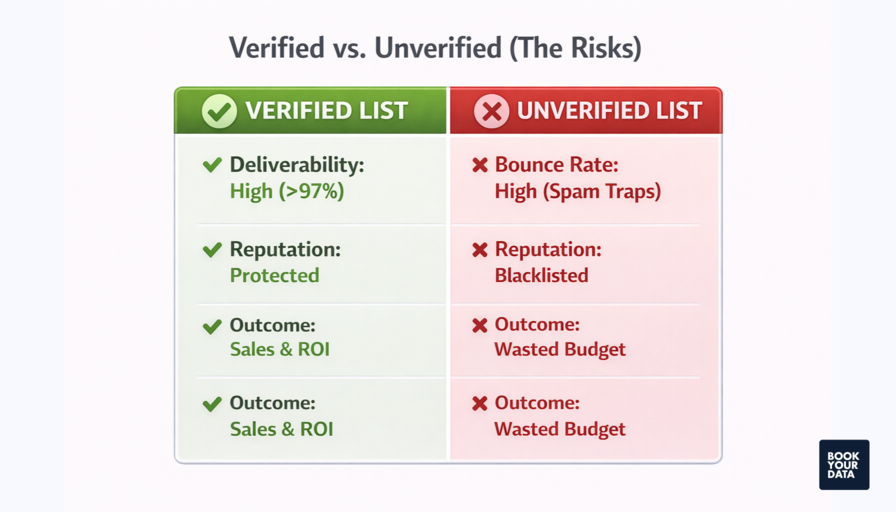
It can lower your inbox placement, damage your sender reputation, waste your email marketing budget, and reduce the return on every campaign you send. If you’re only looking at your bounce rate, you’re missing the bigger picture.
Before sending your next campaign, make sure you’re sending to real people—not dead inboxes.
Stop Paying the Price of Invalid Emails with ZeroBounce
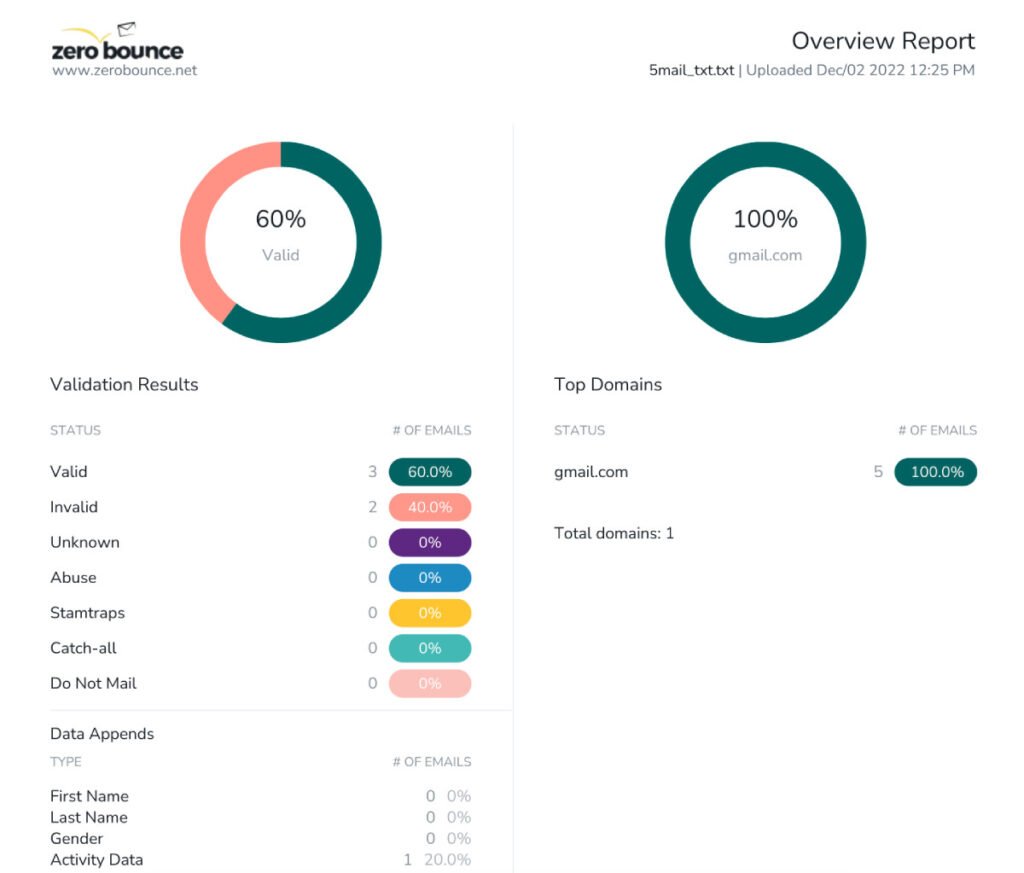
ZeroBounce helps you identify invalid, disposable, abuse, catch-all, and other risky email addresses before you send your campaigns. A clean email list means fewer hard bounces, better deliverability, and a healthier sender reputation.
Use coupon code HAFSA10 to get 10% off paid plans.
What Is an Invalid Email Address?
An invalid email address is one that cannot receive emails.
This may happen because:
- The mailbox has been deleted.
- The domain no longer exists.
- The email address contains typing mistakes.
- The user entered fake information during registration.
- The company email became inactive after an employee left.
Sending emails to these addresses almost always results in hard bounces.
The Hidden Costs Most Businesses Ignore
Many marketers only notice the immediate bounce notification.
The long-term consequences are far more expensive.
1. Your Sender Reputation Declines
Mailbox providers monitor how often your emails bounce.
If too many messages are sent to invalid addresses, providers may assume your mailing list is poorly maintained.
As your sender reputation drops:
- More emails land in spam.
- Fewer subscribers receive your campaigns.
- Future campaigns become less effective.
Recovering a damaged sender reputation can take weeks or even months.
2. Your Email Deliverability Gets Worse
Even if only a small percentage of your list is invalid, it can reduce the overall trust mailbox providers have in your emails.
Over time, legitimate subscribers may stop seeing your emails in their inbox—even though their addresses are perfectly valid.
That’s a hidden cost many businesses don’t notice until engagement starts falling.
3. You Waste Money on Every Campaign
Most email marketing platforms charge based on:
- Number of contacts
- Emails sent
- Monthly email volume
Every invalid address means you’re paying to send emails that will never reach a recipient.
Cleaning your list helps ensure your marketing budget is spent on real prospects instead of dead inboxes.
4. Your Analytics Become Less Reliable
Invalid email addresses distort important performance metrics.
For example:
- Bounce rate appears higher than it should.
- Open rate may look lower.
- Click-through rate becomes less accurate.
- Campaign comparisons become misleading.
Without clean data, it’s much harder to improve future email campaigns.
5. You Risk Hitting Spam Traps
Old, neglected email lists are more likely to contain spam traps.
Spam traps are designed to identify senders with poor email hygiene.
Sending emails to them can seriously damage your sender reputation and make inbox placement much more difficult.
6. Your Team Wastes Time Solving Preventable Problems
When campaigns perform poorly, marketing teams often spend hours:
- Changing subject lines
- Testing new templates
- Switching email platforms
- Investigating deliverability issues
In many cases, the root cause is simply an outdated email list.
Verifying your database before sending is much faster than troubleshooting after problems appear.
Where Invalid Emails Come From
Invalid addresses enter your database more often than many businesses realize.
Common sources include:
- Manual typing mistakes
- Fake registrations
- Old customer databases
- Purchased email lists
- Employees changing companies
- Expired domains
- Outdated CRM records
Even lists that were accurate a year ago can contain many invalid addresses today.
How to Prevent Invalid Emails from Entering Your List
The best strategy isn’t just cleaning your list—it’s preventing bad data from entering it in the first place.
Consider these best practices:
- Verify new email addresses during signup.
- Clean your mailing list regularly.
- Never buy email lists.
- Remove hard-bounced addresses immediately.
- Monitor bounce rates after every campaign.
Small improvements made consistently can significantly improve long-term deliverability.
How ZeroBounce Helps
Instead of waiting for bounce reports after a campaign, ZeroBounce checks your email list before you send.
It helps identify:
- Invalid email addresses
- Disposable email accounts
- Abuse emails
- Spam traps
- Catch-all domainsTemporary email addresses
By removing risky contacts in advance, you can reduce hard bounces, improve inbox placement, and protect your sender reputation.
Frequently Asked Questions
Do invalid email addresses really affect inbox placement?
Yes. A high number of hard bounces signals poor list quality to mailbox providers, which can negatively impact future email deliverability.
How often should I clean my email list?
Most businesses benefit from cleaning their list every one to three months. If you collect new leads regularly, verify them before adding them to your database.
Should I delete every bounced email address?
Hard-bounced addresses should generally be removed. Soft bounces are often temporary and should be monitored before taking action.
Can email verification eliminate all invalid emails forever?
No. Email addresses can become inactive over time. Regular verification helps keep your list accurate as it changes.
Final Thoughts
The cost of sending emails to invalid addresses goes far beyond a few bounced messages. Over time, it can reduce deliverability, weaken your sender reputation, waste your marketing budget, and make every campaign less effective.
Maintaining a clean email list is one of the simplest ways to improve email marketing performance.
Before your next campaign, verify your email list so you’re sending to real inboxes—not addresses that can only hurt your results.
Coupon Code: HAFSA10 — Get 10% off paid plans.
Pingback: How to Improve Email Deliverability Without Changing Your Email Provider -
Pingback: How to Remove Spam Traps from Your Email List Before They Damage Your Reputation - InsightsVaultHQ
Pingback: Why Your Emails Are Going to Spam (And How to Fix It) – 2026 Guide