
You can spend hours creating the perfect email campaign, only to discover that a large number of your messages never had a chance of reaching their recipients.
Invalid addresses, outdated contacts, disposable emails, spam traps, and other risky addresses can quietly accumulate in your database. Sending to them can increase bounces and potentially hurt your sender reputation.
That’s why bulk email verification is worth doing before a large campaign—especially when you’re working with an old, imported, or rapidly growing email list.
In a Hurry? Here’s What to Do
Sending to a large email list? Verify it before your campaign.
Upload your email database to an email verification service, separate valid addresses from invalid and risky ones, and only send your campaign to contacts that are appropriate to email.
Validate your first 100 email addresses for free + use code
HAFSA10for 10% off paid plans.
What Is Bulk Email Verification?
Bulk email verification is the process of checking many email addresses at once to determine which ones are likely to be deliverable and which may create problems.
Instead of checking addresses individually, you upload your database as a file and let the verification service process the list.
For example, imagine you have:
25,000 email addresses
You could manually check individual addresses—but that would be incredibly inefficient.
With bulk verification, you can process the database as a whole and receive categorized results.
ZeroBounce supports bulk verification through uploaded files and can categorize results into statuses such as valid, invalid, catch-all, and other risk categories.
Why Should You Verify an Email List Before Sending?
The biggest reason is simple:
Your email list changes over time.
An address that was valid when someone subscribed may not be valid today.
People:
- Change jobs
- Delete accounts
- Abandon old inboxes
- Switch email providers
- Enter incorrect addresses
- Use temporary email addresses
This natural deterioration of an email database is sometimes called email list decay.
If you don’t periodically clean your list, you’re eventually going to send campaigns to addresses that shouldn’t be there.
What Can Happen If You Skip Verification?
Sending an unverified list can lead to several problems.
Higher Bounce Rates
Invalid addresses can’t receive your email.
If you have a large number of them, your bounce rate can increase significantly.
Poorer List Quality
A database containing disposable emails, spam traps, abuse addresses, and other risky contacts isn’t a healthy marketing database.
Even if those addresses don’t immediately generate a bounce, they can create other deliverability concerns.
Wasted Email Marketing Resources
Why spend money and sending capacity on contacts that can’t receive your emails?
Removing problematic addresses before your campaign means your resources are focused on people who are more likely to receive and engage with your messages.
Potential Damage to Sender Reputation
Repeatedly sending to poor-quality addresses can contribute to deliverability problems.
That’s why list cleaning isn’t just about improving one campaign.
It’s about protecting your ability to reach the inbox in future campaigns.
Which Email Addresses Should You Look For?
Bulk verification isn’t simply about finding addresses that don’t exist.
A good verification process can identify several categories.
Invalid Addresses
These are addresses that are not expected to receive your email successfully.
They should generally be removed or suppressed before sending.
Disposable Email Addresses
These are temporary email addresses that may only exist for a short period.
They’re often associated with one-time registrations or users who don’t want to provide their primary email address.
Whether you should keep or remove them depends on your business model, but they’re worth identifying.
Spam Traps
Spam traps aren’t ordinary subscribers.
They can be used to identify questionable list-collection practices and can create serious deliverability concerns.
They should generally be treated as high-risk contacts.
Abuse Addresses
These are legitimate email addresses that may be more likely to report unwanted messages as spam.
That doesn’t necessarily mean they’re invalid.
It means you need to consider whether continuing to email them makes sense.
Catch-All Addresses
Catch-all domains can accept messages sent to addresses that may not correspond to an active individual mailbox.
This makes them more difficult to classify with certainty.
Rather than automatically treating every catch-all address as invalid, consider the verification result alongside your relationship with the contact.
How to Verify Bulk Email Addresses
The process is relatively straightforward.
Step 1: Export Your Email List
Start by exporting the database you plan to use for your campaign.
Depending on your email platform or CRM, you may be able to export it as:
- CSV
- XLS
- XLSX
- TXT
ZeroBounce currently supports several of these file formats for bulk validation.
Step 2: Upload the List to ZeroBounce
Upload the file to ZeroBounce’s email validation platform.
The service processes the addresses and returns verification results organized by status.
ZeroBounce also offers a free bulk email list evaluator for testing a list before committing to a larger validation process.
Step 3: Review the Results
Don’t simply look at one overall number.
Review the different categories.
For example:
| Result | What to Do |
|---|---|
| Valid | Generally safe to retain |
| Invalid | Remove or suppress |
| Disposable | Consider removing |
| Spam trap | Remove/suppress |
| Abuse | Evaluate carefully |
| Catch-all | Review based on context |
The exact action should depend on your business, consent practices, and email platform.
Step 4: Remove Problematic Addresses
Once you’ve reviewed your results, remove addresses that you shouldn’t be emailing.
At minimum, permanently invalid addresses should not remain active in your campaign list.
ZeroBounce’s own guidance recommends adding valid addresses back to your primary list while removing invalid addresses and high-risk contacts such as spam traps and disposable emails.
Step 5: Import the Cleaned List
Upload the cleaned list back into your email marketing platform or CRM.
Now you’re working with a database that has been screened before the campaign.
When Should You Verify a Bulk Email List?
You don’t necessarily need to verify your entire database every time you send a newsletter.
But there are several situations where it makes particular sense.
Before a Major Campaign
If you’re preparing a large promotional campaign, cleaning the list beforehand can help prevent avoidable delivery problems.
Before Emailing an Old Database
If you haven’t contacted your subscribers for months or years, don’t assume all the addresses are still valid.
Verify the database first.
After Importing a New List
Never blindly merge a new database into your existing contacts.
Verify the new addresses before adding them to your main marketing list.
ZeroBounce specifically recommends cleaning new lists before merging them with an existing database.
When Your Bounce Rate Suddenly Increases
A sudden increase in bounces is a reason to investigate your list.
If you recently imported contacts or changed your signup source, those changes may be responsible.
On a Regular Schedule
Email lists naturally decay.
ZeroBounce recommends bulk verification at least once every three months as one way to keep an existing list updated.
Your ideal schedule can vary depending on how quickly your database changes.
Bulk Verification vs. Real-Time Verification
These two approaches solve slightly different problems.
Bulk Verification
Best for:
- Existing databases
- Large email lists
- Old subscriber lists
- Imported contacts
- Pre-campaign cleaning
Real-Time Verification
Best for:
- Signup forms
- Registration pages
- Lead-generation forms
- Landing pages
- New subscribers
ZeroBounce’s real-time API can verify addresses as users enter them and can help block invalid or high-risk addresses before they enter your database.
Ideally, businesses can use both:
Bulk verification → clean the existing database
Real-time verification → prevent bad data from entering again
How ZeroBounce Fits Into Your Email Workflow
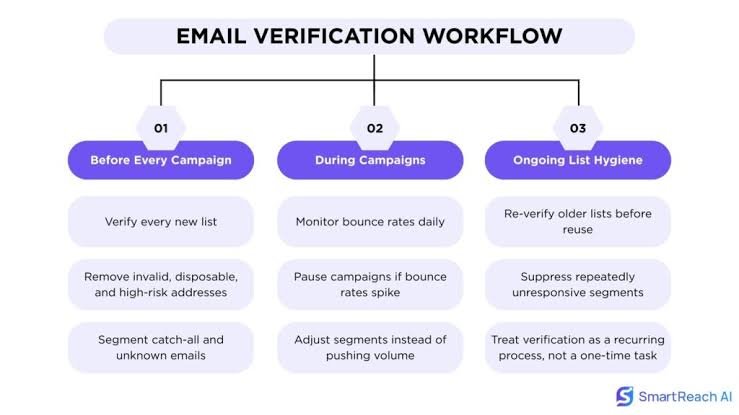
The biggest advantage of bulk verification is that it moves list cleaning before your campaign rather than after it.
A simple workflow looks like this:
Collect contacts → Verify list → Remove risky addresses → Import clean list → Send campaign → Monitor results
ZeroBounce supports both bulk validation and real-time verification, so you can use it for existing lists as well as new addresses entering through forms and other collection points.
It also offers additional deliverability tools, including inbox placement testing, email server testing, blacklist monitoring, and DMARC monitoring.
That makes the platform useful beyond simply checking whether an email address exists.
How Many Emails Can You Verify at Once?
The exact limits depend on the method you’re using.
For bulk file verification, ZeroBounce allows you to upload your email list for processing, while its API offers batch validation for smaller groups of addresses. Its documentation currently describes batch API requests of up to 200 emails at a time, while larger lists can use its bulk file-management endpoints.
For most marketers, the important distinction is simple:
Large existing database → bulk file validation
Website/signup integration → real-time API validation
Does Email Verification Guarantee Delivery?
No.
This is an important distinction.
Email verification helps determine whether an address is valid or risky, but valid does not mean guaranteed inbox placement.
Your deliverability also depends on factors such as:
- Sender reputation
- SPF
- DKIM
- DMARC
- Spam complaints
- Email content
- Recipient engagement
- Receiving-server policies
So think of verification as one important layer of your deliverability strategy, not a magic guarantee.
Common Bulk Verification Mistakes
❌ Sending the Entire Unverified List
If you’ve never cleaned your database, don’t assume it’s safe simply because you’ve been emailing it for years.
❌ Treating Every Non-“Valid” Result as Identical
Different statuses can represent very different risks.
Review the results rather than blindly deleting everything that isn’t marked “valid.”
❌ Verifying Only After a Campaign
If you wait until hundreds of emails bounce, the damage may already have occurred.
Verify before sending.
❌ Forgetting New Contacts
Cleaning your existing database doesn’t solve the problem if new invalid addresses continue entering it.
Consider real-time verification for high-volume signup forms.
❌ Never Rechecking Your Database
Email addresses change.
A clean list today won’t necessarily remain clean forever.
Frequently Asked Questions
Is bulk email verification worth it?
For businesses with large, old, or frequently changing email databases, it can be worthwhile because it helps identify invalid and risky addresses before campaigns are sent.
How often should I verify my email list?
It depends on how quickly your database changes. ZeroBounce recommends bulk verification at least every three months as a general practice for maintaining list quality.
Can I verify an email list for free?
ZeroBounce currently offers a free email verification option for up to 100 contacts when starting out, according to its validation documentation.
Should I remove catch-all email addresses?
Not automatically. Catch-all addresses are more difficult to classify, so consider the verification result and your relationship with the contact before deciding.
Is bulk verification better than checking emails individually?
If you have hundreds or thousands of addresses, bulk verification is considerably more practical. Individual verification makes more sense for occasional addresses or specific checks.
Final Thoughts
Sending a campaign to a large database without verifying it first is a little like mailing thousands of letters without checking whether the addresses still exist.
You may reach plenty of people—but you’ll also waste resources on addresses that were never going to receive your message.
Bulk email verification gives you a chance to clean your database before the campaign.
Start with your existing list, remove confirmed invalid and high-risk contacts, and then put a system in place to verify new addresses as they enter your database.
Validate your first 100 email addresses for free and use coupon code HAFSA10 for 10% off paid plans.
Related Articles
- Why Are My Emails Bouncing? 9 Common Causes and How to Fix Them
- Why High Email Bounce Rates Hurt Your Business (And How to Recover)
- How to Remove Spam Traps from Your Email List Before They Damage Your Reputation
- Email List Hygiene Checklist: 10 Steps to Better Deliverability
- How to Protect Your Sender Reputation and Keep Landing in the Inbox