You spent hours writing the perfect email. It looked great, had a compelling subject line, and offered real value. But your open rates are disappointing because your emails are landing in the spam folder instead of the inbox.
In many cases, the problem isn’t your email content—it’s your email list and sender reputation.
If you want better inbox placement, start by making sure you’re only sending emails to valid addresses.
Improve Email Deliverability with ZeroBounce
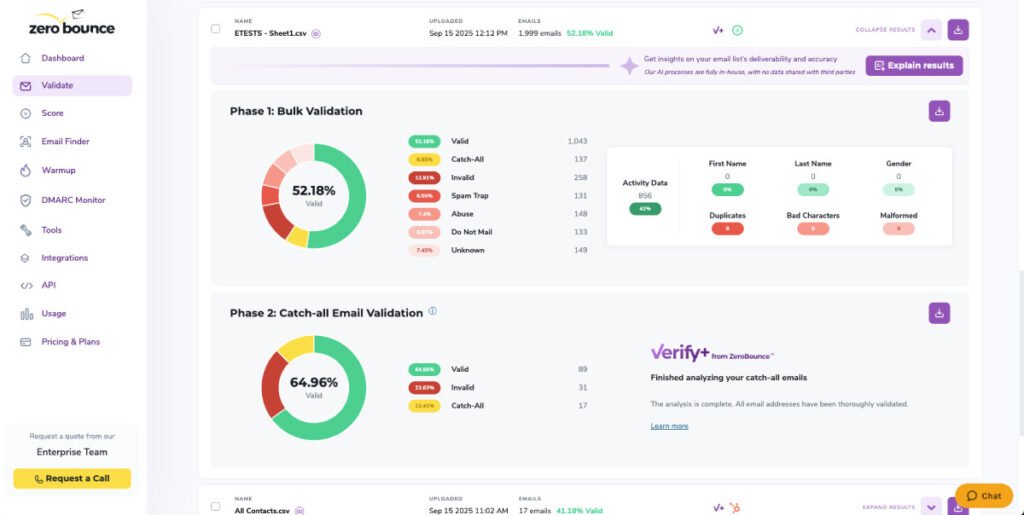
Before changing your email platform or rewriting every campaign, verify your email list with ZeroBounce. It helps identify invalid, disposable, abuse, and risky email addresses that can hurt your sender reputation and reduce deliverability.
Spam filters don’t judge your emails based on one factor. Mailbox providers like Gmail and Outlook evaluate dozens of signals before deciding whether your message belongs in the inbox or spam folder.
Some of the biggest reasons include:
High bounce rates
Sending to invalid email addresses
Poor sender reputation
Spam complaints
Low engagement
Missing email authentication
Spam-like content
Sending too many emails too quickly
The good news is that most of these issues can be fixed.
1. You’re Sending Emails to Invalid Addresses
This is one of the fastest ways to damage your sender reputation.
When emails bounce because the address doesn’t exist, mailbox providers see it as a sign that you’re maintaining a poor-quality mailing list.
Over time, repeated hard bounces reduce the trust they place in your domain and IP address.
How to fix it
Verify your email list before every major campaign.
Email verification removes:
Invalid addresses
Deleted mailboxes
Fake signups
Disposable emails
Abuse emails
This keeps your bounce rate low and protects your reputation.
2. Your Sender Reputation Has Dropped
Every email sender builds a reputation.
If your emails frequently bounce, receive spam complaints, or are ignored by recipients, mailbox providers become less likely to place future emails in the inbox.
Think of sender reputation as a credit score for email marketing.
The better your sending practices, the higher your chances of reaching the inbox.
3. Your Domain Isn’t Properly Authenticated
Mailbox providers want proof that your emails are actually coming from your domain.
Missing authentication records can make your emails look suspicious.
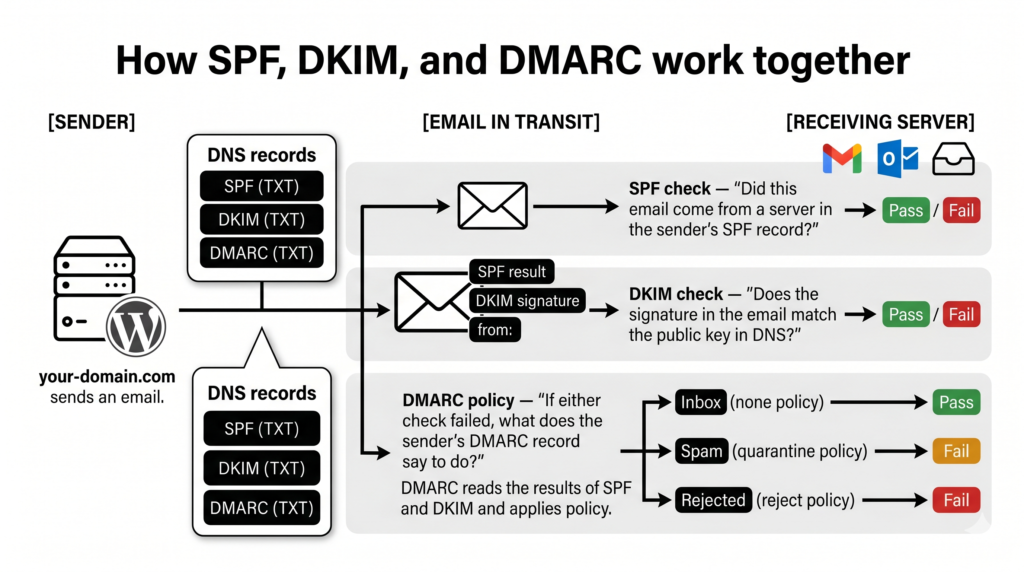
Check that your domain has:
SPF
DKIM
DMARC
These authentication methods help verify your identity and improve email trust.
SPF DKIM DMARK explained
4. Your Subject Lines Look Like Spam
Certain writing habits trigger spam filters.
Avoid subject lines like:
FREE MONEY!!!
ACT NOW!!!
Guaranteed Winner
Limited Time!!!!!!!
Instead:
Write naturally.
Be specific.
Avoid excessive punctuation.
Don’t overuse capital letters.
The goal is to sound like a real person—not a spammer.
5. You’re Emailing People Who Never Engage
Mailbox providers track engagement.
If recipients consistently ignore your emails, future campaigns are more likely to be filtered into spam.
Instead of repeatedly emailing inactive subscribers:
Create a re-engagement campaign.
Ask whether they still want your emails.
Remove subscribers who remain inactive after multiple attempts.
6. Your Bounce Rate Is Too High
A high bounce rate is one of the strongest warning signs for mailbox providers.
Common causes include:
Old email lists
Purchased email lists
Typing mistakes
Expired company email addresses
Cleaning your list before sending significantly reduces bounce rates.
7. You’re Sending Emails Too Frequently
Even subscribers who willingly joined your list can become frustrated if they receive too many emails.
This often leads to:
Unsubscribes
Spam complaints
Lower engagement
Focus on sending valuable emails rather than increasing frequency.
8. You’re Using Purchased Email Lists
Buying email lists might seem like a shortcut, but it’s one of the quickest ways to hurt your email deliverability.
Purchased lists often contain:
Invalid addresses
Spam traps
Disposable emails
People who never agreed to receive your emails
Building your own permission-based list is far more effective in the long run.
How ZeroBounce Helps Improve Inbox Placement
Improving deliverability starts with a healthy email list.
ZeroBounce helps by identifying risky email addresses before you send your campaign, including:
Invalid emails
Disposable addresses
Abuse emails
Spam traps
Catch-all domains
Removing these contacts reduces hard bounces and supports a stronger sender reputation, giving your emails a better chance of reaching the inbox.
Email Deliverability Checklist
Before sending your next campaign, make sure you have:
✅ Verified your email list
✅ Removed invalid email addresses
✅ Configured SPF, DKIM, and DMARC
✅ Avoided spammy subject lines
✅ Cleaned inactive subscribers
✅ Avoided purchased email lists
✅ Tested your email before sending
Frequently Asked Questions
Why do my emails go to spam even if recipients subscribed?
Spam filters evaluate many factors beyond permission, including sender reputation, authentication, bounce rate, and recipient engagement.
Does cleaning my email list improve deliverability?
Yes. Removing invalid and risky email addresses reduces hard bounces and helps protect your sender reputation.
Can ZeroBounce guarantee inbox placement?
No email verification service can guarantee inbox placement because mailbox providers consider many factors. However, verifying your email list helps eliminate one of the biggest causes of poor deliverability: sending to invalid or risky addresses.
How often should I verify my email list?
Verify new subscribers as they join your list and recheck your entire database every few months, especially before major email campaigns.
Final Thoughts
Landing in the spam folder is rarely caused by a single issue. More often, it’s the result of several small problems that gradually reduce mailbox providers’ trust in your emails.
By maintaining a clean email list, authenticating your domain, writing natural email copy, and protecting your sender reputation, you can significantly improve your chances of reaching the inbox.
Before sending your next campaign, make email verification your first step.