A high email bounce rate can make you want to clean your list aggressively—but deleting every subscriber who bounced isn’t the right solution.
Some bounces happen because an address is permanently invalid. Others are temporary problems caused by a full inbox, receiving-server issues, or other conditions that may resolve themselves.
The goal is to remove genuinely bad addresses while preserving subscribers who can still receive your emails.
Table of Contents
In a Hurry? Here’s What to Do
High bounce rate? Don’t delete your entire list.
First, separate hard bounces from soft bounces. Remove or suppress permanently invalid addresses, investigate temporary failures, and verify the remaining list before your next campaign.
Validate your first 100 email addresses for free + use code HAFSA10 for 10% off paid plans.
What Is a High Email Bounce Rate?
Your email bounce rate is the percentage of emails that couldn’t be delivered.
For example, if you send 10,000 emails and 300 bounce, your bounce rate is 3%.
The important thing isn’t simply seeing a bounce—it is understanding what caused it.
A high rate can indicate:
Outdated email addresses
Invalid addresses
Poor-quality lead sources
Disposable email accounts
Spam traps
Temporary delivery problems
Poor list hygiene
ZeroBounce recommends keeping bounce rates low and provides email validation designed to identify addresses likely to bounce. Its current platform also detects invalid, disposable, inactive, spam-trap, abuse, and catch-all addresses.
Hard Bounce vs. Soft Bounce: Don’t Treat Them the Same
This is the first distinction you should make when trying to reduce your bounce rate.
Hard Bounces
A hard bounce usually means the email cannot be delivered permanently.
Examples include:
Non-existent email address
Deleted mailbox
Invalid domain
Permanently rejected recipient
These addresses generally shouldn’t remain active in your mailing list.
What to do
Suppress or remove confirmed hard-bounced addresses from future campaigns.
Soft Bounces
Soft bounces are generally temporary delivery problems.
For example:
The recipient’s inbox is full.
The receiving server is temporarily unavailable.
The message is temporarily rejected.
The receiving system is experiencing technical problems.
A soft bounce doesn’t automatically mean that the subscriber is lost.
What to do
Don’t immediately delete these subscribers.
Monitor repeated failures and follow your email provider’s suppression rules.
Why You Shouldn’t Delete Everyone Who Bounced
Imagine you have 20,000 subscribers and 500 emails bounce.
Deleting all 500 immediately might seem like the easiest solution.
But what if some of those 500 were temporary failures?
You could unnecessarily remove people who are still interested in your business.
Instead, think of bounce management as a sorting problem:
Permanent problem → suppress/remove
Temporary problem → monitor
Uncertain address → verify/investigate
This approach protects your list without sacrificing legitimate subscribers.
7 Reasons Your Bounce Rate May Be High
1. Your List Contains Old Email Addresses
Email databases naturally become outdated.
People:
Change jobs
Leave companies
Delete accounts
Stop using old inboxes
Switch email providers
A list that hasn’t been cleaned for years can therefore contain a significant number of addresses that are no longer useful.
Solution
Verify older lists before sending another large campaign.
2. People Entered Their Email Address Incorrectly
Typos are extremely common when people manually enter their email addresses.
Examples include:
gmial.com
gmai.com
yaho.com
outlok.com
These mistakes can turn an otherwise legitimate lead into an undeliverable contact.
Solution
Use validation at signup and periodically verify your existing database.
3. You’re Importing Poor-Quality Leads
If your bounce rate suddenly increases after importing a new list, look closely at where those contacts came from.
A database collected through questionable sources may contain:
Invalid addresses
Disposable emails
Fake registrations
Spam traps
Unengaged contacts
Solution
Verify imported lists before adding them to your regular marketing campaigns.
4. You’re Sending to Disposable Addresses
Disposable email services provide temporary inboxes that may stop working after a short period.
They’re sometimes used to register for services without giving a primary email address.
Solution
Filter disposable addresses before sending important campaigns.
ZeroBounce specifically includes disposable-email detection as part of its email validation service.
5. Your List Contains Spam Traps
Spam traps aren’t ordinary subscribers.
They can be used by anti-spam organizations or mailbox providers to identify questionable email practices.
They may enter your database through:
Purchased lists
Scraped addresses
Poor list collection
Neglected databases
Solution
Avoid questionable list sources and use email verification before sending to older or unfamiliar databases.
6. The Receiving Server Is Temporarily Rejecting Emails
Sometimes your subscriber’s address is completely legitimate.
The receiving server may simply be unavailable or temporarily rejecting incoming messages.
Solution
Don’t assume every bounce means the subscriber is invalid.
Check the bounce reason and allow your email provider to retry temporary failures when appropriate.
7. Your Sending Setup Has Problems
Not every email delivery issue originates from your list.
Your domain authentication and sender reputation can also affect delivery.
Make sure your domain is properly configured for:
SPF
DKIM
DMARC
And monitor your sending reputation and complaint rates.
How to Fix a High Bounce Rate Without Losing Subscribers
Now let’s get to the important part.
Step 1: Analyze Your Bounce Report
Before deleting anything, examine your campaign report.
Look at:
Bounce percentage
Hard bounces
Soft bounces
Error messages
The domains affected
Whether the increase happened suddenly
This tells you whether the problem is your list, your sending setup, or a temporary delivery issue.
This immediately prevents you from repeatedly sending to addresses that cannot receive your emails.
Step 3: Don’t Delete Subscribers Based on One Soft Bounce
A single temporary failure isn’t enough reason to assume someone has abandoned their inbox.
Instead, monitor repeated soft bounces.
If an address repeatedly fails over multiple campaigns, investigate it according to your email platform’s policies.
Step 4: Verify the Rest of Your List
This is where an email verification service becomes particularly useful.
Instead of guessing which addresses are safe, verify your database before your next campaign.
ZeroBounce says its validation service checks for categories including invalid, disposable, spam-trap, abuse, catch-all, and other risky addresses.
This can help you separate:
Good contacts → continue emailing
Invalid contacts → remove/suppress
Risky or uncertain contacts → investigate or segment
Step 5: Protect Your New Subscribers
Cleaning an old database solves only half the problem.
You also need to stop bad addresses from entering your list again.
Consider verifying email addresses during signup.
ZeroBounce offers real-time email verification through an API that can be connected to registration forms and other places where you collect email addresses.
That means you can catch problematic addresses closer to the point where they’re submitted.
Step 6: Stop Buying Email Lists
If you’re constantly purchasing new databases to replace removed subscribers, you’re creating a cycle.
A bigger list isn’t necessarily a better list.
Purchased lists can contain:
Invalid addresses
Outdated contacts
Spam traps
Disposable emails
People who never agreed to receive your emails
Build your own permission-based audience instead.
Step 7: Monitor Your Bounce Rate After Cleaning
Don’t stop after one cleanup.
Compare your next campaign with your previous results.
Watch:
Bounce rate
Spam complaints
Open rate
Click-through rate
Unsubscribe rate
If your bounce rate drops after cleaning, you’ve identified at least part of the problem.
How ZeroBounce Fits Into the Process
ZeroBounce isn’t a replacement for your email marketing platform.
It’s a list-quality and deliverability tool that can sit before your campaign.
ZeroBounce supports both bulk list validation and real-time verification, and its current platform also includes deliverability-related tools such as inbox placement testing and blacklist monitoring.
For businesses with large or aging email databases, that makes verification much easier than manually investigating thousands of addresses.
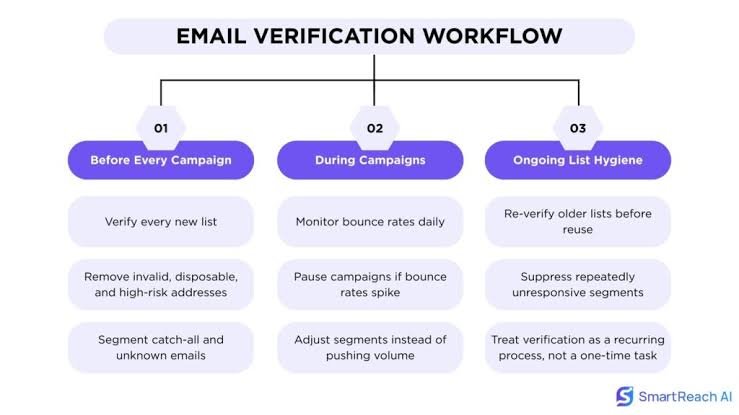
Email List verification Workflow
How Often Should You Clean Your Email List?
There’s no universal schedule that works for every business.
A company adding thousands of new subscribers every week may need more frequent verification than a small newsletter adding a few dozen contacts a month.
The more quickly your database changes, the more frequently you should pay attention to list quality.
What About Subscribers Who Never Open Your Emails?
Don’t confuse bounces with inactivity.
Someone who doesn’t open your email may still have a perfectly valid address.
Deleting them solely because they haven’t opened one campaign can be premature.
Instead, consider a re-engagement campaign.
For example:
“Still want to hear from us?”
Give inactive subscribers an opportunity to confirm that they want to remain on your list.
Only after repeated inactivity should you consider suppressing them according to your email strategy and applicable consent requirements.
Common Mistakes to Avoid
❌ Deleting every bounced address immediately
Not all bounces are permanent.
❌ Continuing to send to hard bounces
A permanently invalid address won’t suddenly become valid because you keep trying.
❌ Buying replacement lists
You may simply introduce another batch of bad addresses.
❌ Ignoring the source of your leads
If a particular signup source produces unusually high bounces, investigate it.
❌ Cleaning your list once and forgetting about it
Email databases change constantly.
Frequently Asked Questions
What’s a good email bounce rate?
The ideal rate depends on your audience, list source, and sending practices. A sudden increase is often more informative than one universal benchmark. If your bounce rate is consistently high, investigate your list quality and sending setup.
Should I remove soft bounces?
Not automatically. Soft bounces can be temporary. Look at repeated failures and the specific bounce reason before suppressing the subscriber.
Can I reduce my bounce rate without losing subscribers?
Yes. The key is to distinguish permanent failures from temporary ones. Verify your list, remove confirmed invalid addresses, and give legitimate subscribers experiencing temporary problems a chance to receive future emails.
Can ZeroBounce guarantee that every email will be delivered?
No email verification service can guarantee delivery to every address. Verification helps determine whether addresses are valid or risky, but delivery also depends on factors such as mailbox status, sender reputation, authentication, and receiving-server policies.
Should I verify my entire email list?
If you have an old or large database, verifying the list before a major campaign can help identify invalid and risky addresses before you send to them.
Final Thoughts
A high bounce rate doesn’t mean you need to throw away your entire email list.
The smarter approach is to diagnose first, clean selectively, and protect the subscribers who are still valuable.
Separate hard bounces from soft bounces, remove confirmed invalid addresses, verify questionable contacts, and improve the way you collect new subscribers.
That way, you’re not choosing between a clean list and a large list.