If you have hundreds or thousands of email addresses, checking them one by one before a campaign isn’t realistic.
Email lists naturally collect bad data over time. People mistype their addresses, old accounts become inactive, employees leave companies, and temporary email addresses eventually disappear.
Sending to all of those addresses without checking them first can increase bounces and waste your email marketing resources.
That’s where bulk email validation comes in.
In a Hurry? Here’s What to Do
Have a large email list and don’t know which addresses are safe to email?
Bulk email validation lets you check hundreds or thousands of addresses at once, identify invalid and risky contacts, and clean your list before sending your campaign.
Validate your first 100 email addresses for free + use code HAFSA10 for 10% off paid plans.
What Is Bulk Email Validation?
Bulk email validation is the process of checking a large number of email addresses at the same time to determine whether they are valid, invalid, or potentially risky.
Instead of checking addresses individually, you upload your email database to a verification service.
The service then analyzes the addresses and provides results that help you decide which contacts should remain on your mailing list.
For example, imagine you have 15,000 subscribers.
Rather than manually checking 15,000 addresses, you can process the entire list in bulk and review the results together.
This makes bulk validation particularly useful for:
Email marketers
Businesses with large databases
Lead-generation campaigns
E-commerce stores
SaaS companies
Agencies
Newsletters
Businesses with older email lists
Why Should You Validate Email Addresses in Bulk?
The main reason is simple:
Not every address in your database is still usable.
Your email list isn’t static.
Even if every address was legitimate when collected, some will eventually become outdated.
People:
Change jobs
Delete accounts
Abandon old inboxes
Switch email providers
Enter incorrect addresses
Use temporary email addresses
Without validation, you may continue sending to those addresses without realizing they’re no longer useful.
Reduce Avoidable Bounces
Invalid addresses can’t receive your emails.
Removing them before a campaign can reduce bounces that could have been prevented through better list hygiene.
Protect Your List Quality
A database containing thousands of inactive or risky contacts isn’t necessarily valuable.
Bulk validation helps you understand what’s actually inside your list.
Save Sending Resources
If your email platform charges according to contacts or emails sent, repeatedly sending to invalid addresses wastes resources.
You want your campaigns focused on people who can actually receive your emails.
Identify Risky Addresses
Validation can identify more than obvious invalid addresses.
Depending on the service, you may also discover:
Disposable emails
Spam traps
Abuse addresses
Catch-all domains
Other potentially risky contacts
This gives you more information when deciding how to manage your database.
What Does Bulk Email Validation Check?
The exact checks depend on the service you’re using, but a comprehensive validation process can examine several factors.
Email Syntax
The system checks whether the address follows a recognizable email format.
For example:
name@example.com
has a fundamentally different structure from:
nameexample.com
Syntax checks can catch obvious formatting problems.
Domain
The domain is checked to determine whether it exists and appears capable of handling email.
An address using a non-existent domain is unlikely to be useful for your campaign.
Mail Server
The receiving domain’s mail-server configuration can also be checked.
This provides additional information about whether the domain appears capable of receiving email.
Mailbox
Some verification processes attempt to determine whether the individual mailbox appears deliverable without sending a normal marketing email to it.
This can help distinguish potentially usable addresses from obvious problems.
Disposable Addresses
Temporary email services can create addresses designed for short-term use.
These addresses may become inactive relatively quickly.
If you’re building a long-term marketing audience, identifying disposable addresses can be useful.
Spam Traps
Spam traps aren’t ordinary subscribers.
They can be used by mailbox providers and anti-spam organizations to identify questionable sending practices.
Their presence in your database can be a warning sign that your list-collection process needs attention.
Abuse Addresses
Some addresses are associated with a higher likelihood of reporting unwanted emails.
They’re not necessarily invalid, but they may represent additional risk.
How to Validate Email Addresses in Bulk
The process is usually straightforward.
Step 1: Export Your Email List
First, export the database you want to validate from your email marketing platform, CRM, spreadsheet, or other source.
Depending on the platform, your list may be available as:
CSV
XLS
XLSX
TXT
Before uploading it, make sure you have permission to process and email the contacts.
It’s also a good idea to keep an untouched copy of your original database.
That way, you always have the original data if you need to compare results later.
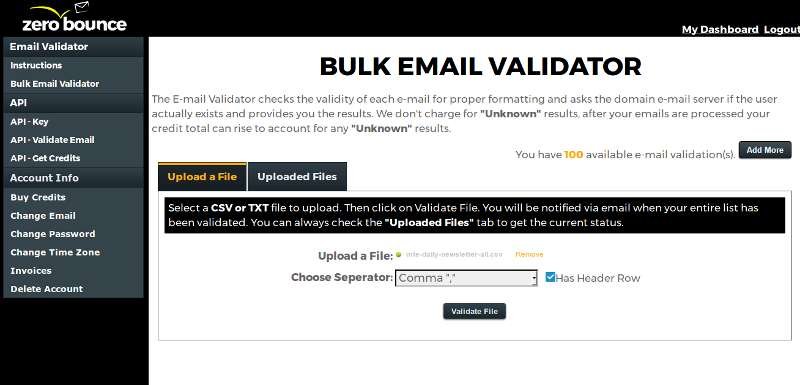
Step 2: Upload Your List
Next, upload the file to your chosen email validation service.
With ZeroBounce, you can upload a list for bulk email validation and receive verification results for the addresses included in the file.
The goal isn’t simply to find addresses that are syntactically incorrect.
A comprehensive verification process can identify different categories of addresses so you can make better decisions about your list.
email list validation
Step 3: Review the Verification Results
The service processes the uploaded addresses and assigns results to them.
You may see categories such as:
Valid
Invalid
Disposable
Spam trap
Abuse
Catch-all
Unknown
The exact categories depend on the verification service.
Don’t automatically treat every category in exactly the same way.
Your decision should depend on your business, relationship with the contact, consent, and email platform.
Step 4: Clean Your Email List
Once you’ve received the results, separate the addresses according to their status.
At minimum, confirmed invalid addresses should generally not continue receiving marketing emails.
High-risk addresses should also be reviewed carefully.
For example:
Valid → Keep
Invalid → Suppress/remove
Spam trap → Suppress/remove
Disposable → Review
Abuse → Review
Catch-all → Evaluate
This is much safer than simply deleting a random percentage of your database.
Step 5: Import Your Clean List
After cleaning your data, import the appropriate contacts back into your email marketing platform.
Before doing so, make sure you don’t accidentally reintroduce the addresses you just removed.
It’s also worth maintaining a suppression list so that known bad addresses don’t get added again later.
When Should You Validate Your Email List?
You don’t necessarily need to validate your entire database before every single email.
But there are several situations when it makes particularly good sense.
Before a Major Campaign
Launching a major promotion or sending to your entire database?
Validate the list first.
The larger the campaign, the more important list quality becomes.
Before Sending to an Old List
If you haven’t emailed a database for months or years, don’t assume all the addresses are still valid.
Verify it before reactivating the list.
After Importing New Contacts
A newly acquired list should be checked before being merged with your existing database.
This is especially important when contacts come from multiple sources.
When Your Bounce Rate Suddenly Increases
A sudden jump in bounces is a reason to investigate.
Look at what changed:
Did you import new contacts?
Did you change your signup source?
Did you reactivate an old list?
Did your sending volume increase?
The answer can help you identify where the problem originated.
Periodically
Email addresses change over time.
A list that was clean six months ago may not be equally clean today.
For frequently changing databases, periodic validation can help keep list quality under control.
Bulk Validation vs. Real-Time Validation
These two methods aren’t competitors.
They solve different problems.
Bulk Validation
Bulk validation is ideal for your existing database.
This helps prevent bad addresses from entering your database in the first place.
ZeroBounce offers an API designed for real-time email validation, making it possible to integrate verification into forms and other signup processes.
The best approach?
Use both when appropriate.
Bulk validation cleans your existing database.
Real-time validation helps keep new data clean.
How ZeroBounce Can Help
If you have a few dozen addresses, manual checking may not seem like a big deal.
But imagine trying to investigate:
10,000 addresses.
Or:
50,000 addresses.
Or even:
500,000 addresses.
That’s where automated bulk validation becomes much more practical.
ZeroBounce provides bulk email validation designed to process large lists and categorize addresses based on their verification results.
It can help identify addresses such as:
Invalid
Disposable
Spam traps
Abuse
Catch-all
Other risky contacts
The platform also provides real-time email validation through an API, allowing businesses to verify new addresses as they’re collected.
That means you can use one workflow for your existing database and another for new subscribers.
Suggested Image: A simple two-path graphic: “Existing List → Bulk Validation” and “New Subscriber → Real-Time Validation.”
Does Email Validation Guarantee Delivery?
No.
This is an important distinction.
An email address being classified as valid does not guarantee that your message will land in the inbox.
Delivery can also depend on:
Sender reputation
SPF
DKIM
DMARC
Spam complaints
Email content
Sending behavior
Recipient engagement
Receiving-server policies
Think of email validation as removing avoidable problems from your list.
It doesn’t control everything that happens after you click “send.”
How Much Can Bulk Validation Improve Your Email List?
There’s no universal percentage.
Every database is different.
A brand-new permission-based list may have very few problematic addresses.
An old database collected over many years may have considerably more.
The important metric isn’t how many addresses you remove.
It’s whether your remaining database is healthier and more useful.
If you discover that a large percentage of your list is invalid or risky, that’s also valuable information.
It may indicate a problem with:
Your signup forms
Lead sources
Data imports
List acquisition practices
Database maintenance
Common Bulk Validation Mistakes
❌ Validating Only After a Campaign
If you wait until thousands of emails bounce, you’ve waited too long.
Validate before sending.
❌ Treating Every Result as “Keep” or “Delete”
Not every status represents the same level of risk.
Review the categories and decide what makes sense for your particular list.
❌ Forgetting Your Original Database
Keep a backup before making major changes.
You don’t want an accidental deletion to become permanent.
❌ Cleaning Your List Once
Email addresses don’t stop changing after one verification.
Your database needs ongoing maintenance.
❌ Continuing to Add Unverified Contacts
If new addresses constantly enter your database without any verification, your list can deteriorate again.
Consider real-time verification for high-volume signup sources.
Frequently Asked Questions
What is bulk email validation?
Bulk email validation is the process of checking many email addresses at once to determine whether they’re valid, invalid, or potentially risky before sending email campaigns.
How do I validate thousands of email addresses?
Export your database, upload it to a bulk email verification service such as ZeroBounce, review the results, remove or suppress problematic addresses, and import the cleaned list back into your email platform.
Can bulk validation reduce bounce rates?
It can help reduce avoidable bounces caused by invalid or problematic addresses. However, it cannot prevent temporary delivery failures or every other type of bounce.
Should I validate my email list before every campaign?
Not necessarily. The right frequency depends on how quickly your database changes. However, validating old lists, imported databases, and lists before major campaigns can be particularly useful.
Is bulk email validation better than checking addresses individually?
For hundreds or thousands of contacts, yes. Bulk validation is much more practical than manually checking each address.
Can I validate new email addresses automatically?
Yes. Real-time email verification APIs can be integrated into signup forms and other systems to check addresses as they’re collected.
Final Thoughts
If your business relies on email marketing, your database is one of your most important assets.
But a large database isn’t automatically a healthy one.
Addresses become outdated. People make typos. Temporary accounts disappear. Risky contacts can enter through forms and imported lists.
Bulk email validation gives you a chance to identify those problems before your campaign does.
Start by validating your existing database, remove or suppress confirmed problematic addresses, and then consider real-time verification to prevent the same issues from coming back.
The goal isn’t to have the largest email list.
It’s to have a list filled with people you can actually reach.