You spent time building an email list, writing your campaign, and creating an offer worth clicking. Then the results disappoint.
Your open rates drop. Replies disappear. Clicks are lower than expected.
The problem may not be your copy.
Your emails may simply not be reaching the inbox.
Email deliverability issues can quietly affect almost every part of your email marketing strategy. A message can be technically delivered to a recipient’s mail server while still being filtered into spam, promotions, quarantine, or another folder where the recipient may never see it.
Table of Contents
Fixing deliverability is not about finding one magic setting. It requires looking at your email list quality, sender reputation, authentication, engagement, sending behavior, and technical setup.
If you’re unsure where the problem is coming from,
Validate your first 100 email addresses for free + use code HAFSA10 for 10% off paid plans.
In this guide, you’ll learn how to identify and fix common email deliverability problems and improve your chances of consistently reaching the inbox.
What Is Email Deliverability?
Email deliverability refers to your ability to successfully reach a recipient’s inbox.
It is important to distinguish this from email delivery.
An email can be accepted by the recipient’s mail server and counted as delivered, but that does not guarantee inbox placement. The message may still be routed to spam or another filtered folder.
In simple terms:
Email delivery: Did the recipient’s mail server accept the message?
Email deliverability: Did the message successfully reach a place where the recipient is likely to see it?
Inbox placement: What percentage of your emails reached the inbox compared with spam and other folders?
That distinction matters because a high delivery rate can create a false sense of security. Your campaign may show that most emails were delivered while a significant number never reached the primary inbox.
Why Are My Emails Not Reaching the Inbox?
Most deliverability problems come from a combination of signals rather than one single mistake.
Mailbox providers evaluate factors such as:
Sender and domain reputation
Email authentication
Bounce rates
Spam complaints
Recipient engagement
Sending volume and consistency
Email list quality
Blacklist status
Server configuration
Content and campaign behavior
A poor result in one area may not immediately destroy your deliverability. However, several weak signals together can make mailbox providers less likely to trust your emails.
The best approach is to diagnose your email program systematically rather than randomly changing subject lines and hoping for better results.
1. Start by Checking Whether You Have a Delivery or Deliverability Problem
Before fixing anything, determine what is actually happening.
Ask yourself:
Are emails bouncing?
Are emails being rejected before delivery?
Are they delivered but landing in spam?
Is the problem affecting Gmail, Outlook, Yahoo, or all providers?
Did deliverability suddenly decline after increasing sending volume?
Are only certain campaigns performing poorly?
These questions matter because different problems require different solutions.
For example:
A large number of invalid addresses points toward a list quality problem.
Emails going to spam may indicate a reputation, authentication, engagement, or content issue.
Rejections may indicate a technical configuration or blacklist problem.
Poor performance at one mailbox provider may suggest a provider-specific reputation or filtering issue.
Testing inbox placement can help you see how different mailbox providers classify your emails. ZeroBounce’s Inbox Placement Tester, for example, checks whether test messages land in the inbox, spam, or other folders across multiple mailbox providers.
What to do
Do not immediately change your entire email strategy.
First, collect data about:
Bounce rate
Spam complaint rate
Open and click trends
Unsubscribe trends
Inbox placement
Delivery errors
Sender and domain reputation
Authentication status
Once you know where the problem is occurring, your fixes can become much more targeted.
2. Clean Your Email List Before Sending More Campaigns
One of the fastest ways to create deliverability problems is repeatedly sending emails to addresses that should not be on your list.
Email lists naturally deteriorate over time.
People:
Change jobs
Abandon old inboxes
Use temporary email addresses
Make typing mistakes when signing up
Create fake accounts
Stop engaging with your emails
Sending repeatedly to invalid or risky addresses increases your bounce rate and can negatively affect your sender reputation.
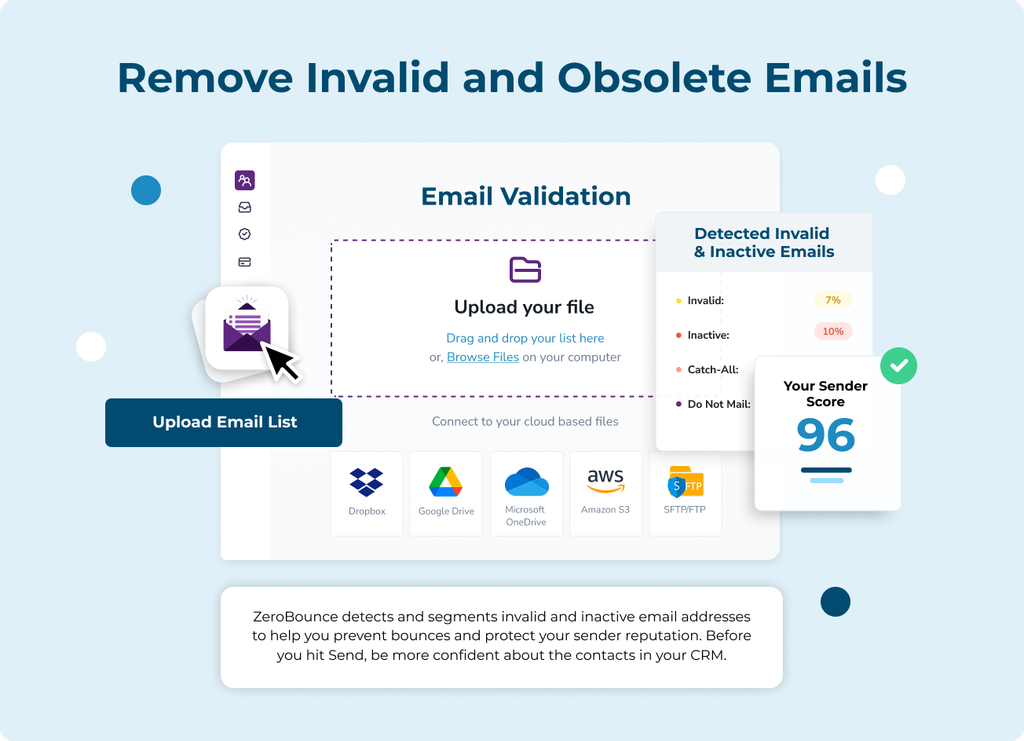
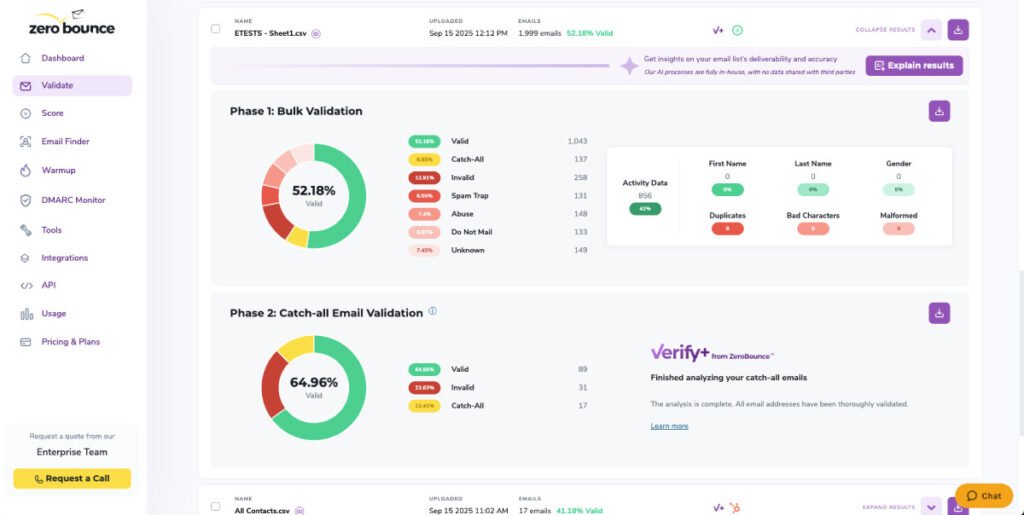
ZeroBounce recommends using email validation to identify problematic addresses before sending and notes that keeping bounce rates below approximately 2% can help protect deliverability. Its validation tools can identify invalid, disposable, abuse, spam-trap-risk, inactive, and other problematic email addresses.
How to improve email list quality
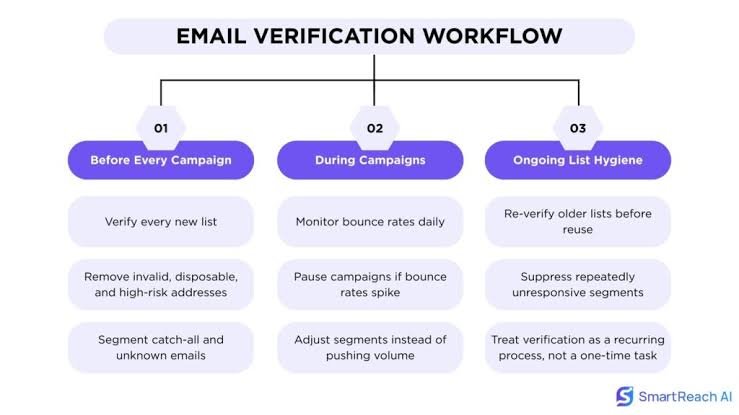
Before a major campaign:
Export your email list.
Run the list through an email validation service.
Remove invalid addresses.
Review risky categories carefully.
Avoid repeatedly emailing unengaged contacts.
Validate lists regularly rather than only once.
For businesses collecting new leads continuously, real-time email validation can also prevent bad addresses from entering the database in the first place.
Verify your first 100 emails for free with zerobounce
3. Fix Your Email Authentication Records
Email authentication is one of the foundations of modern deliverability.
Mailbox providers want evidence that the sender is genuinely authorized to send from the domain shown in the email.
The three major authentication standards are:
SPF
Sender Policy Framework (SPF) specifies which servers are authorized to send email for your domain.
A properly configured SPF record helps receiving servers determine whether a sending server is legitimate.
DKIM
DomainKeys Identified Mail (DKIM) adds a cryptographic signature to your outgoing messages.
This allows receiving servers to verify that the message has not been altered and that it was authorized by the sending domain.
DMARC
Domain-based Message Authentication, Reporting, and Conformance (DMARC) works alongside SPF and DKIM.
It helps domain owners define how receiving providers should handle messages that fail authentication checks and can provide visibility into unauthorized use of a domain.
Authentication failures can contribute to messages being blocked or rejected. ZeroBounce’s deliverability tools specifically identify authentication-related issues and offer monitoring for SPF, DKIM, and DMARC-related signals.
What to do
If your deliverability is struggling:
Confirm SPF is correctly configured.
Enable DKIM signing.
Set up DMARC.
Check whether your visible From domain aligns properly with your authentication setup.
Monitor authentication failures rather than assuming your records are working permanently.
Authentication alone will not guarantee inbox placement, but poor authentication can make every other deliverability problem harder to solve.
4. Protect Your Sender and Domain Reputation
Your sender reputation is essentially the level of trust mailbox providers associate with your sending identity.
If your reputation becomes poor, even legitimate emails can face increased filtering.
Several factors can affect reputation, including:
High bounce rates
Spam complaints
Poor engagement
High unsubscribe rates
Authentication problems
Sudden volume spikes
Blacklist listings
Email server performance
ZeroBounce lists these signals among the factors that can affect sender reputation and inbox placement.
How to protect your reputation
Send consistently
Avoid long periods of inactivity followed by massive campaigns.
Sudden, unpredictable sending behavior can look suspicious, particularly for newer domains or addresses without an established sending history.
Avoid sending to everyone
Not every contact needs to receive every campaign.
Segmenting your list allows you to prioritize people who are most likely to find your message relevant.
Watch complaint rates
Spam complaints are particularly damaging because they provide a strong negative signal about how recipients perceive your messages.
Make unsubscribing easy and respect opt-out requests promptly.
Don’t keep mailing disengaged contacts forever
A large list is not necessarily a valuable list.
Sending to people who consistently ignore your emails can weaken engagement signals and make your campaigns less effective.
5. Warm Up New or Inactive Sending Domains
If you recently started using a new domain, new sending address, or previously inactive infrastructure, immediately sending thousands of emails can create problems.
Mailbox providers have little historical information about new senders.
A gradual increase in sending volume can help establish a more natural sending pattern.
Email warmup typically involves gradually increasing activity while generating positive interaction signals through controlled email exchanges.
ZeroBounce includes warmup among its deliverability tools designed to help businesses build sending reputation alongside list validation, inbox testing, server testing, blacklist monitoring, and authentication tools.
A practical approach
Instead of:
Day 1: Send 50,000 emails
Consider gradually increasing volume while closely monitoring:
Bounces
Complaints
Engagement
Inbox placement
Provider-specific performance
The exact pace should depend on your existing reputation, sending history, list quality, and infrastructure.
6. Test Your Emails Before Sending Them to Your Entire List
One of the biggest mistakes businesses make is discovering deliverability problems only after a campaign has already been sent.
Inbox placement testing allows you to send a representative version of your campaign to test addresses and see how different providers classify it.
This can reveal problems before your real audience receives the campaign.
For accurate testing, the test email should closely resemble the actual campaign in its content, layout, subject line, and overall structure. Using unrealistic placeholder content can produce misleading results.
Also Get the Discount of 10% on paid plan using the coupen HAFSA10.
email list cleaned using Zerobounce
7. Monitor Spam Complaints and Make Your Emails More Relevant
Spam complaints are not always caused by obvious spam.
Sometimes recipients mark legitimate emails as spam because:
They don’t remember subscribing.
They receive emails too frequently.
The content is irrelevant.
The email does not match their expectations.
Unsubscribing is difficult.
The sender identity is unclear.
The solution is not simply avoiding certain “spam words.”
Focus on relevance.
Improve relevance by:
Segmenting your audience.
Sending based on user interests or behavior.
Matching content to the reason someone subscribed.
Avoiding unnecessary frequency.
Setting clear expectations at signup.
Using a recognizable sender name and address.
Providing an easy unsubscribe option.
ZeroBounce notes that low engagement, high unsubscribe rates, and spam complaints can negatively affect inbox placement because mailbox providers may interpret these as signs that recipients do not find the emails relevant.
8. Check Your Email Content Without Obsessing Over “Spam Trigger Words”
Content can influence deliverability, but the idea that one specific word automatically sends every email to spam is outdated and overly simplistic.
Modern filtering systems evaluate many signals together.
Instead of obsessively removing words, focus on whether your message looks trustworthy and useful.
Review:
Misleading subject lines
Excessive punctuation
Overly aggressive sales language
Suspicious links
Mismatched link domains
Poor HTML formatting
Image-heavy emails with little text
Unclear sender identity
Content that doesn’t match recipient expectations
Your email should make sense to both the recipient and the mailbox provider.
A trustworthy sender identity, relevant content, proper authentication, healthy engagement, and good list hygiene are usually more important than trying to “hack” spam filters.
9. Check for Blacklisting and Server Problems
Sometimes your email content is not the main issue.
Technical problems may prevent messages from reaching recipients properly.
These can include:
IP or domain blacklisting
Mail server configuration errors
Authentication failures
DNS issues
Poor server reputation
Connection problems
ZeroBounce’s deliverability toolkit includes email server testing and blacklist monitoring alongside inbox placement testing and authentication monitoring. These tools are designed to help diagnose infrastructure-related problems that can affect email delivery and inbox placement.
What to do
If your emails are suddenly being rejected or disappearing:
Check recent sending changes.
Review authentication.
Check delivery error messages.
Monitor blacklist status.
Test your email server configuration.
Compare performance across mailbox providers.
Technical issues are often easier to solve once you know exactly which layer is failing.
10. Reduce Sudden Changes in Sending Behavior
Mailbox providers look at patterns over time.
If your domain normally sends 500 emails per week and suddenly sends 100,000 emails in one day, that change may trigger additional scrutiny.
The same principle applies when:
Changing sending providers
Switching domains
Using new IP addresses
Importing a large purchased or old list
Launching campaigns after months of inactivity
Whenever possible, make changes gradually.
If you must increase volume significantly, monitor your metrics closely rather than assuming your previous deliverability performance will automatically continue.
11. Remove or Re-Engage Inactive Subscribers
Inactive subscribers create a difficult decision.
Deleting every inactive subscriber immediately may not be necessary, but continuing to email people who never engage can also hurt campaign performance.
A better approach is to segment inactive contacts.
For example:
Recently engaged subscribers
Continue sending your normal campaigns.
Moderately inactive subscribers
Reduce frequency or test more targeted content.
Long-term inactive subscribers
Run a re-engagement campaign.
Still inactive after re-engagement
Consider suppressing or removing them from regular campaigns.
ZeroBounce also offers activity data designed to help businesses identify recent engagement signals and prioritize contacts who have been active within selected time periods.
The goal is not simply to maintain the largest possible list.
The goal is to maintain a list that supports sustainable deliverability.
12. Monitor Deliverability Continuously
Email deliverability is not something you fix once and forget.
A healthy email program can develop problems because of:
List deterioration
Infrastructure changes
Changes in sending behavior
New spam complaints
Authentication failures
Reputation decline
New blacklisting issues
Regular monitoring helps you detect problems before they become severe.
A deliverability dashboard can centralize important signals such as inbox placement, spam rates, authentication status, reputation, and delivery errors. ZeroBounce’s current Deliverability Dashboard integrates deliverability and reputation data to help identify issues earlier.
Monitor these metrics regularly
Bounce rate
Spam complaint rate
Inbox placement
Delivery errors
Open and click trends
Unsubscribe trends
Sender reputation
Domain reputation
Authentication status
Blacklist status
Look for changes rather than focusing only on individual numbers.
A sudden decline often tells you more than a single metric viewed in isolation.
A Simple Email Deliverability Troubleshooting Checklist
If your emails are not reaching the inbox, work through this checklist.
Email list
Validate your email addresses.
Remove invalid addresses.
Identify risky contacts.
Avoid repeatedly sending to disengaged subscribers.
Authentication
Check SPF.
Enable DKIM.
Configure DMARC.
Verify alignment and domain setup.
Reputation
Monitor bounce rates.
Monitor spam complaints.
Avoid sudden sending spikes.
Warm up new sending infrastructure.
Content and engagement
Send relevant content.
Segment your audience.
Avoid misleading subject lines.
Make unsubscribing easy.
Review inactive subscribers.
Technical health
Test inbox placement.
Review delivery errors.
Check blacklist status.
Test email server configuration.
How ZeroBounce Can Help Fix Email Deliverability Issues
Email deliverability problems often involve multiple layers.
You may have:
Invalid addresses increasing bounces.
Weak authentication.
Reputation problems.
Poor inbox placement.
Blacklist issues.
Technical server errors.
A lack of visibility into provider-specific performance.
ZeroBounce offers tools covering these different areas, including email validation, real-time verification, inbox placement testing, warmup, email server testing, blacklist monitoring, DMARC monitoring, and deliverability reporting.
This makes it possible to approach deliverability as an ongoing process:
Clean your list → Build sender trust → Test campaigns → Monitor performance → Fix issues early.
According to ZeroBounce, its email validation service currently offers up to 99.6% accuracy for qualifying email categories under its published guarantee, while its broader platform combines list validation with sender reputation and deliverability tools.
Frequently Asked Questions About Email Deliverability
Why are my emails delivered but not in the inbox?
Because delivery and inbox placement are different.
A recipient’s mail server may accept your email, but filtering systems can still place it in spam, promotions, quarantine, or another folder. Inbox placement testing can help identify where your messages are landing.
What is the fastest way to improve email deliverability?
There is no single fix, but cleaning a poor-quality email list, correcting authentication, and addressing reputation problems are often important starting points.
If you do not know the cause, diagnose the problem first instead of making random changes.
Can a high bounce rate hurt email deliverability?
Yes. Invalid email addresses can increase bounce rates, and high bounce rates can negatively affect sender reputation and inbox placement.
Does SPF, DKIM, and DMARC guarantee inbox placement?
No.
Authentication is important, but inbox placement also depends on reputation, list quality, engagement, sending behavior, complaints, and other factors.
How often should I clean my email list?
The ideal frequency depends on how quickly your list changes and how you collect addresses.
Businesses that continuously acquire leads should consider ongoing or regular validation rather than waiting until deliverability problems appear.
Why do emails suddenly start going to spam?
Common causes include:
A sudden increase in sending volume
Declining sender reputation
More spam complaints
High bounce rates
Authentication problems
Blacklisting
Poor recipient engagement
Changes to sending infrastructure
Comparing recent changes in your email program can help identify the likely cause.
Final Thoughts: Fixing Deliverability Is About Building Trust
Better inbox placement is not achieved by one subject-line trick or one technical setting.
Mailbox providers are constantly evaluating whether your sending behavior appears trustworthy and whether recipients actually want your emails.
The strongest long-term strategy is simple:
Send to real people, protect your authentication, maintain a healthy reputation, create relevant emails, and monitor problems before they grow.
Start with your email list. Then verify your authentication, review your reputation, test your inbox placement, and monitor your sending infrastructure.
When you treat email deliverability as an ongoing part of your marketing strategy rather than something to fix only during a crisis, you’ll have a much better chance of consistently reaching the people you worked so hard to acquire.