
You send an email campaign expecting your subscribers to receive it, only to discover that some messages bounced back.
A few bounces may seem harmless. But when bounce rates start increasing, they can signal a much bigger problem.
High bounce rates can hurt campaign performance, waste your email marketing budget, and damage the reputation of the domain or sender you rely on to reach customers. In some cases, the addresses on your list are simply invalid. In others, the problem may come from temporary mailbox issues, full inboxes, authentication failures, or sending restrictions.
The key is understanding why your emails are bouncing before repeatedly sending to the same problematic addresses.
Validate your first 100 emails for free with ZeroBounce — get 10% off with code HAFSA10.
In this guide, we’ll break down the most common reasons emails bounce back, what different bounce messages mean, and how to reduce email bounces before they affect your deliverability.
What Does It Mean When an Email Bounces Back?
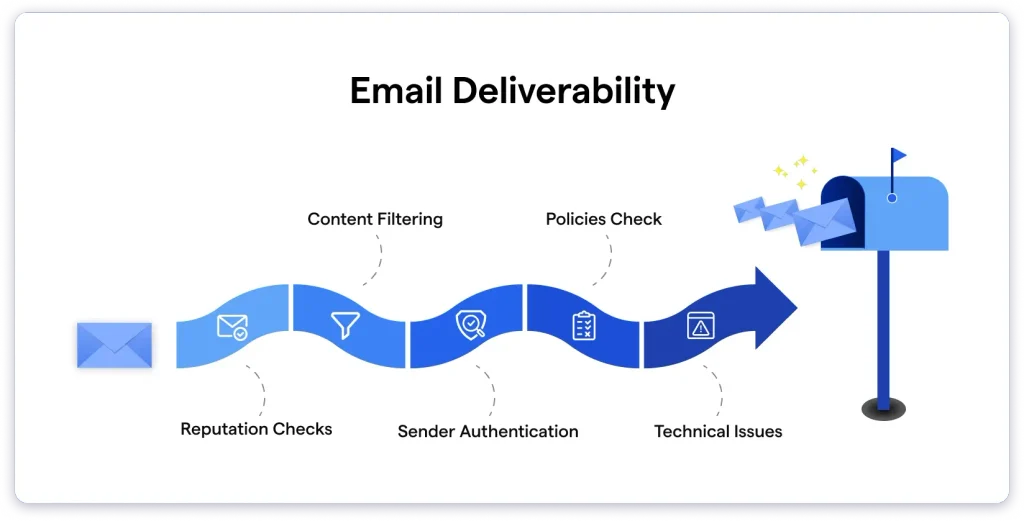
An email bounce happens when an email cannot be successfully delivered as intended and is returned to the sender or reported as undeliverable by the receiving mail server.
However, not every bounce means the same thing.
Some failures are permanent, while others are temporary.
For example:
- An email address that does not exist may cause a permanent failure.
- A recipient’s mailbox that is temporarily full may cause a temporary failure.
- A receiving server experiencing a temporary technical problem may reject an email that could be accepted later.
This is why simply looking at your overall bounce rate is not enough. You also need to understand which addresses are bouncing and why.
Why Do Emails Bounce Back? Common Causes
1. The Email Address Does Not Exist
One of the most common reasons emails bounce is that the address is no longer valid.
For example:
- The subscriber entered the wrong address.
- There was a spelling mistake during signup.
- The employee left the company.
- The organization closed the mailbox.
- The email account was deleted.
When an address no longer exists, continuing to send messages to it serves no purpose and can unnecessarily increase your bounce rate.
How to fix it
Validate your email list before sending large campaigns and remove addresses identified as invalid.
This is especially important if you have:
- An old email list
- A list collected over several years
- Contacts imported from multiple sources
- Business contacts whose employment information may have changed
2. There Is a Typo in the Email Address
A single typing mistake can turn a potentially valid subscriber into a bounced email.
Common examples include:
gamil.cominstead ofgmail.com- Missing characters
- Extra spaces
- Misspelled company domains
- Incorrect domain extensions
If the address was entered through a website form, real-time email validation can help identify some problems before the incorrect address enters your database.
How to fix it
Review how you collect email addresses.
Consider adding validation at signup so users are less likely to submit:
- Invalid addresses
- Misspelled domains
- Disposable addresses
- Obviously incorrect formats
For existing lists, bulk email validation can help identify addresses that are no longer safe to send to.
3. The Recipient’s Mailbox Is Full
A recipient may have a valid email address but temporarily be unable to receive additional messages because their mailbox has reached its storage limit.
This is generally considered a temporary delivery problem.
The address itself may still be valid, and the recipient may receive emails again after freeing up space.
How to fix it
Do not immediately treat every mailbox-full bounce as a permanently invalid address.
Instead:
- Review the bounce reason.
- Identify whether the failure appears temporary.
- Allow time before retrying where appropriate.
- Avoid repeatedly sending the same message in a short period.
Your email service provider may automatically retry certain temporary failures, depending on its system and settings.
4. The Recipient’s Email Server Is Temporarily Unavailable
Sometimes the problem is not your list.
The receiving mail server may be temporarily unavailable due to:
- Maintenance
- High traffic
- Server outages
- Technical problems
In these situations, the email address may still be completely valid.
How to fix it
Check whether the bounce message indicates a temporary server issue.
Avoid immediately deleting these addresses from your list. Instead, monitor whether future attempts succeed.
If a supposedly temporary issue continues over multiple campaigns, investigate further.
5. Your Sending Domain or IP Has a Poor Reputation
Mailbox providers evaluate the trustworthiness of email senders.
If your sending reputation declines, messages may face stricter filtering or rejection.
Reputation problems can develop because of:
- High bounce rates
- Spam complaints
- Sending to poor-quality lists
- Sudden sending-volume spikes
- Low recipient engagement
- Repeated sending to inactive or invalid contacts
This creates a cycle:
Poor list quality → More bounces → Reputation problems → More delivery difficulties.
How to fix it
Focus on improving the quality of your sending practices.
Start by:
- Removing invalid addresses.
- Avoiding purchased or unverified lists.
- Sending consistently rather than unpredictably.
- Monitoring complaints.
- Prioritizing engaged subscribers.
If reputation is part of the problem, simply changing your email copy is unlikely to solve it.
Check our detailed article on: How to Improve Email Sender Reputation: A Practical Guide when discussing sender and domain trust.
6. Your Emails Are Being Blocked by the Receiving Server
A receiving server may reject an email because of its policies or because it identifies something concerning about the message or sender.
Possible reasons include:
- Authentication failures
- Suspicious sending behavior
- Blacklist issues
- Reputation problems
- Server configuration problems
The bounce notification can provide useful information about why the message was rejected.
How to fix it
Review:
- The exact SMTP error or bounce message
- Your sender reputation
- SPF configuration
- DKIM configuration
- DMARC configuration
- Blacklist status
- Recent changes to your email infrastructure
Do not ignore repeated rejection messages. If many recipients are receiving similar errors, the problem may be with your sending setup rather than individual email addresses.
7. Your Email List Has Become Outdated
Email lists naturally change over time.
People change jobs, companies update domains, and old inboxes are abandoned.
This is particularly common with B2B email lists because professional email addresses often stop working when someone changes employers.
A list that performed well a year ago may contain a significant number of outdated contacts today.
How to fix it
Make email list cleaning a regular part of your marketing process.
Instead of waiting for bounce rates to rise:
- Validate old lists before reusing them.
- Clean large lists before major campaigns.
- Remove clearly invalid addresses.
- Review risky addresses carefully.
- Validate new contacts when they enter your database.
CTA BUTTON: Check Your List Before Bounces Damage Your Deliverability →
Validate your first 100 emails for free with ZeroBounce — get 10% off with code HAFSA10.
Hard Bounces vs. Soft Bounces
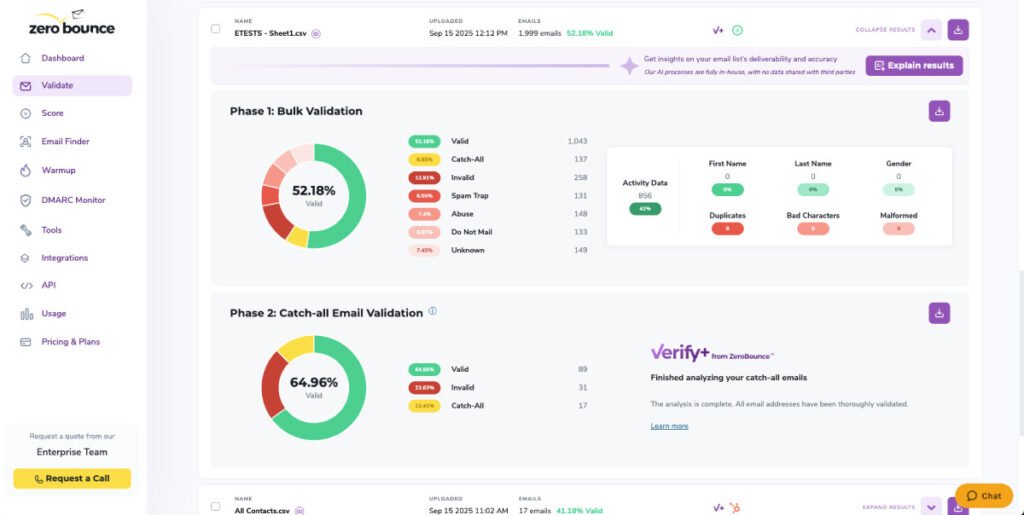
Understanding the difference between hard and soft bounces can help you decide what to do with an address.
What Is a Hard Bounce?
A hard bounce usually indicates a permanent delivery failure.
Common reasons include:
- The email address does not exist.
- The domain does not exist.
- The mailbox has been permanently closed.
- The recipient server permanently rejects the address.
These addresses generally should not remain on your active sending list.
Continuing to email permanently invalid addresses can increase unnecessary bounces and harm your sending reputation.
What Is a Soft Bounce?
A soft bounce usually indicates a temporary delivery problem.
Examples include:
- A full mailbox
- Temporary server downtime
- A temporarily unavailable recipient server
- A message that exceeds certain size limitations
A soft bounce does not automatically mean the email address is invalid.
The appropriate action depends on whether the problem resolves or continues over time.
Read our detailed article on: Why Are My Emails Bouncing? 9 Common Causes and How to Fix Them for readers who want a more detailed breakdown of bounce causes.
How to Stop Emails From Bouncing
You cannot prevent every email bounce.
Temporary technical problems can happen even when you maintain a high-quality email list.
However, you can significantly reduce avoidable bounces by improving your list quality and sending practices.
1. Validate Your Email Addresses Before Sending
This is one of the most practical steps for reducing avoidable bounces.
Email validation can help identify addresses that are:
- Invalid
- Misspelled
- Disposable
- Associated with non-existent domains
- Potentially risky to send to
For large campaigns, validating the entire list before sending can prevent known problematic addresses from increasing your bounce rate.
Read our detailed guide on: How to Validate Email Addresses in Bulk: A Complete Guide here.
2. Verify Large Lists Before Every Major Campaign
If you regularly work with large databases, list quality should not be treated as a one-time task.
Before an important campaign, consider:
- Exporting the current list.
- Validating the addresses.
- Removing clearly invalid contacts.
- Reviewing uncertain categories.
- Sending only to addresses that meet your campaign requirements.
This is particularly important when you have not contacted a segment for a long time.
Read our detailed guide on: How to Verify Bulk Email Addresses Before Sending a Campaign here.
3. Clean Your Email List Regularly
Email hygiene is ongoing.
A contact that was valid when it entered your database may become invalid later.
Regular list cleaning can help reduce:
- Bounce rates
- Wasted sends
- Unnecessary costs
- Reputation risks
You do not necessarily need to delete every subscriber with low engagement immediately. However, permanently invalid addresses should not continue receiving campaigns.
Read our detailed guide on: How to Clean an Email List for Better Deliverability: A Step-by-Step Guide here.
4. Use Double Opt-In for Important Lists
Double opt-in requires subscribers to confirm their email address after signing up.
This can help reduce incorrect or fake email addresses entering your list.
It also provides stronger evidence that the person intended to subscribe.
While double opt-in may reduce the total number of contacts collected, it can improve list quality.
5. Avoid Sending to Unverified Purchased Lists
Large email lists can look tempting, especially when you’re trying to scale outreach.
But an unverified list may contain:
- Outdated addresses
- Invalid mailboxes
- Spam traps
- Contacts who never consented to receive your emails
Even if some addresses are technically valid, poor recipient engagement and complaints can still create deliverability problems.
If you acquire a list from an external source, validating it is particularly important before sending.
6. Monitor Your Bounce Rate
Do not wait until a campaign performs badly to check your bounce data.
Review bounce trends after campaigns.
Look for:
- Sudden increases
- Specific segments with high bounce rates
- A particular domain causing repeated failures
- Differences between campaigns
A sudden increase may indicate that your list quality has changed or that your sending infrastructure has developed a problem.
Read our detailed guide on: How to Reduce Email Bounce Rate: 10 Proven Ways to Stop Emails From Bouncing here.
What Bounce Rate Is Too High?
The answer can depend on your industry, list source, and email program.
However, the most important point is that you should pay attention to changes.
For example, if your bounce rate usually remains low and suddenly doubles or triples, investigate the cause.
A consistently rising bounce rate can indicate:
- An aging list
- Poor data collection
- A recent import of low-quality contacts
- Infrastructure problems
- Changes in your sending practices
Rather than waiting until the number becomes severe, investigate unusual trends early.
How Email Bounces Affect Deliverability
Bounces do more than reduce the number of people who receive one campaign.
Repeatedly sending to invalid addresses can affect how mailbox providers evaluate your sending practices.
High bounce rates can contribute to:
- Poor sender reputation
- More spam filtering
- Reduced inbox placement
- Campaign performance issues
This is why email validation and deliverability are closely connected.
A clean list gives you a stronger foundation for the rest of your email program.
Read our detailed guide on: How to Improve Email Deliverability and Keep Your Emails Out of Spam here.
A Simple Process to Reduce Email Bounces
Use this workflow before major campaigns:
Step 1: Review your list
Check when the addresses were collected and whether they have been used recently.
Step 2: Validate the addresses
Identify invalid and potentially risky contacts before sending.
Step 3: Remove clearly undeliverable addresses
Do not repeatedly send to addresses that are permanently invalid.
Step 4: Review bounce messages
Separate temporary problems from permanent failures.
Step 5: Monitor your campaign
Watch bounce trends and investigate unusual increases.
Step 6: Maintain your list
Continue cleaning and validating as your database changes.
This approach is much more effective than waiting for bounce rates to become a serious deliverability issue.
Frequently Asked Questions
Why do my emails keep bouncing back?
Your emails may bounce because the address does not exist, the recipient mailbox is temporarily unavailable, the receiving server is experiencing technical problems, or your sending setup is being rejected.
The bounce message usually provides the best clue about the specific reason.
Should I resend an email after it bounces?
It depends on the bounce type.
A temporary failure may resolve and can sometimes be retried. A permanent failure should generally not be repeatedly retried.
Do invalid email addresses hurt sender reputation?
Repeatedly sending to invalid addresses can increase bounce rates, which can negatively affect your sending reputation and deliverability.
Should I remove soft bounces from my list?
Not immediately in every case.
Soft bounces can be temporary. Monitor whether the address becomes deliverable again or continues to fail.
Can email verification reduce bounce rates?
Yes. Validating email addresses before sending can help identify addresses that are likely to be undeliverable, allowing you to remove them before they generate avoidable bounces.
Final Thoughts
Email bounces are not always a sign that your email campaign failed.
Some bounces happen because of temporary problems outside your control.
However, repeated hard bounces and consistently high bounce rates should never be ignored.
The best way to reduce avoidable bounces is to focus on prevention.
Maintain a clean email list, validate addresses before major campaigns, monitor bounce messages, and investigate unusual changes in your sending performance.
A smaller list of valid and relevant contacts is often far more valuable than a large database filled with outdated addresses.
Before your next campaign, take the time to check the quality of your list. Removing problematic addresses before you hit send can protect your deliverability, reputation, and future campaign performance.