
Running an e-commerce business means constantly creating visual content. You need product advertisements, promotional graphics, seasonal campaigns, social media posts, and different creative versions to test with your audience. As your product catalogue grows, producing all these assets manually can become a repetitive and time-consuming responsibility.
For many online businesses, Canva has been a convenient solution. Its templates and editing tools make it possible to create attractive designs without hiring a professional graphic designer. But what happens when you need more than attractive graphics? What if your main challenge is producing multiple advertising variations, developing ad copy, and organising a more focused creative-testing process? That’s where a specialised advertising tool like AdCreative.ai becomes worth considering.
Explore AdCreative.ai: The promotional signup offer includes 20 credits and a 7-day free trial. Eligible advertisers may also qualify for up to $500 in Google Ads promotional credit, with the amount based on qualifying advertising spend and applicable terms.
The Google Ads credit is a separate promotional offer, not an automatic $500 signup reward. Eligibility and the credit amount depend on qualifying spend and the offer’s terms.
Disclosure: This article contains affiliate links. We may earn a commission if you sign up through our links, at no additional cost to you.
Canva vs. AdCreative.ai: What Is the Actual Difference?
Before deciding which tool is better, it’s important to understand that Canva and AdCreative.ai are designed around different creative workflows.
Canva is a general-purpose visual design platform. It helps users create social media graphics, presentations, documents, videos, marketing materials, and many other types of visual content.
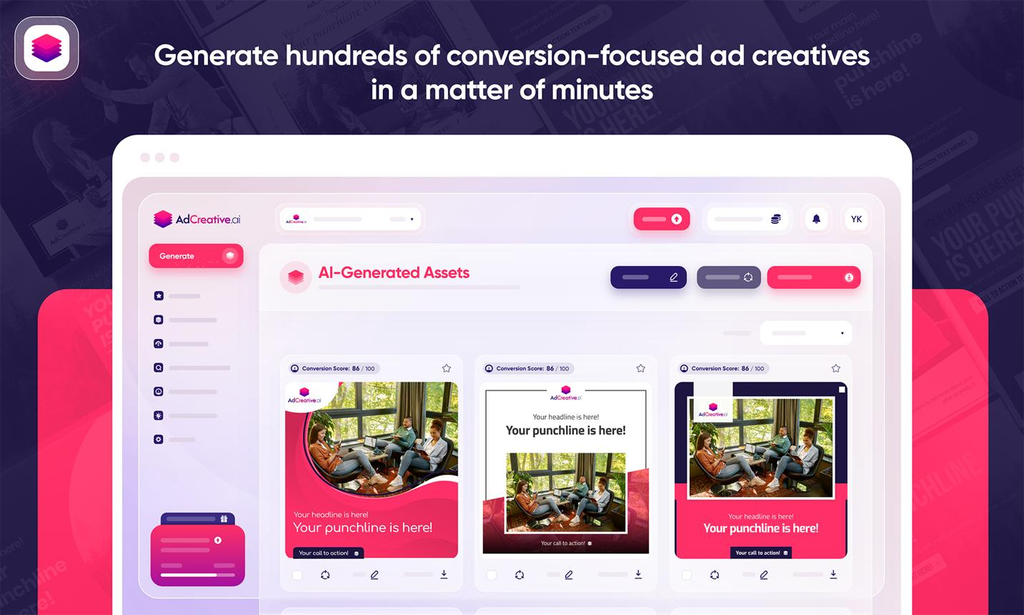
AdCreative.ai is more specialised. Its primary focus is advertising creative production, including generating ad designs, variations, and advertising text. It also offers features such as creative scoring and competitor insights, depending on the plan.
In simple terms:
- Canva: A flexible design platform for creating and editing many types of visual content.
- AdCreative.ai: An advertising-focused platform for generating and evaluating advertising creatives.
They overlap in some areas, but they are not identical alternatives.
1. Canva: A Flexible Design Tool for E-Commerce Businesses
Canva is popular because it makes graphic design accessible to people who don’t have professional design experience.
An online store owner can choose a template, upload product photographs, add promotional text, adjust colours, and create a finished design using its editor.
For example, imagine you own an online clothing store and want to promote a new collection.
You could use Canva to create:
- New collection announcement graphics.
- Discount and sale advertisements.
- Product promotion posts.
- Instagram Stories.
- Facebook promotional graphics.
- Seasonal campaign designs.
You can customise templates to match your brand and make changes to individual design elements.
Canva’s AI Features
Canva also offers AI-assisted design features. Its Magic Design tool can generate design templates from prompts, text, and uploaded media. Users can then edit the generated designs in the Canva editor.
Other useful capabilities include:
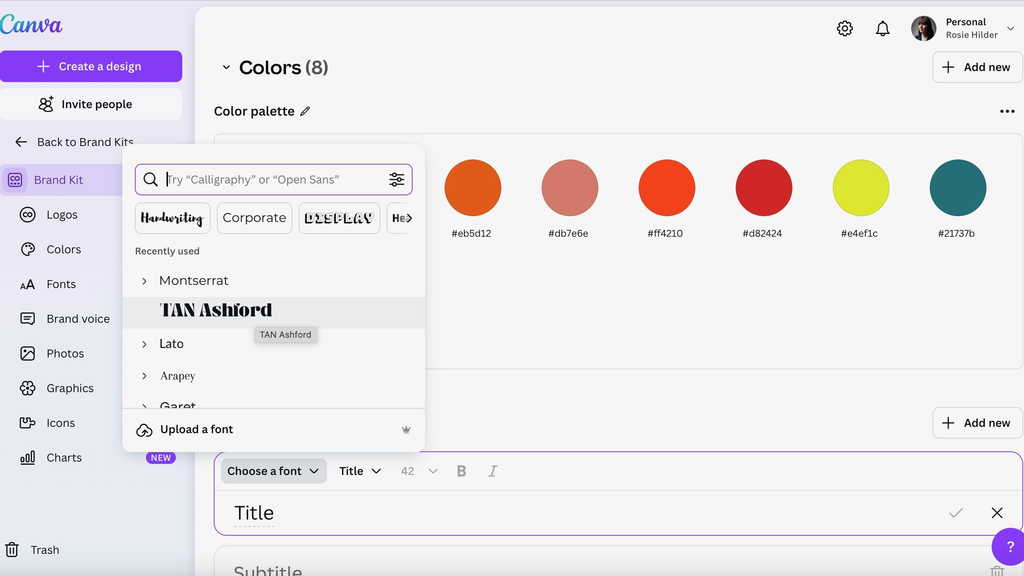
Brand Kits: Store brand colours, fonts, logos, and other assets to maintain visual consistency.
Magic Resize: Resize designs into different formats and dimensions. Availability depends on the Canva plan.
AI-assisted design: Generate design drafts from written descriptions and customise the results.
Editing flexibility: Adjust individual text elements, images, backgrounds, colours, and layouts.
These features make Canva useful for businesses that need a broad range of visual content rather than advertisements alone.
Where Canva Can Become Time-Consuming
The flexibility of Canva is also part of its workflow.
When you want a very specific advertising concept, you may still need to spend time selecting a suitable template, arranging product images, writing headlines, adjusting layouts, and creating additional variations.
For example, suppose you want five different advertisements for the same product:
- A discount-focused design.
- A product-benefit design.
- A lifestyle-focused design.
- A new-arrival announcement.
- A promotional design with a different headline.
You can create all of these in Canva, but you still need to make design decisions and edit the individual assets.
That is not a disadvantage for every user. If you enjoy designing and need precise control over the finished graphics, Canva may be exactly what you want.
However, businesses that repeatedly need advertising variations may prefer a tool with a more advertising-specific workflow.
2. AdCreative.ai: An Advertising-Focused AI Platform
AdCreative.ai approaches creative production from a different direction.
Instead of focusing on general graphic design, it provides tools specifically intended to help businesses and marketers produce advertising assets.
The platform includes features for generating ad creatives, advertising text, product visuals, and video-related content. It also offers creative analysis and scoring features.
For an e-commerce business, this can be useful because advertising often involves more than creating one attractive product image.
You may need multiple versions of the same advertisement to explore different messages, visual styles, and promotional angles.
What Can You Do With AdCreative.ai?
Here are some of its relevant capabilities.
1. Generate Advertising Creatives
You can use the platform to generate advertising designs based on your product and brand information.
Rather than starting every design from a blank canvas, you can review generated options and choose the ones that fit your campaign.
2. Generate Advertising Copy
AdCreative.ai includes AI-powered text-generation features that can help produce headlines and advertising text.
For example, if you’re promoting a pair of wireless headphones, you could explore different messaging angles:
- Product features.
- Everyday convenience.
- Design and appearance.
- Promotional discounts.
- Specific customer needs.
You should still review the generated copy to ensure that it accurately represents your product.
3. Create Product-Focused Visuals
Product photos are important for online stores. AdCreative.ai offers AI-powered product photoshoot and visual-generation features that can help businesses explore different product presentations.
This can be useful when you want to create more visual variations without arranging a completely new photoshoot for every concept.
4. Explore Creative Scoring and Insights
One feature that distinguishes AdCreative.ai from a general design editor is its advertising-focused analysis.
The platform offers Creative Scoring and Creative Insights features intended to help users evaluate their advertising creatives.
These tools can provide additional information when deciding which designs to review or test.
However, an AI-generated score should not be treated as proof that an advertisement will generate sales. Actual performance must be evaluated using real campaign results.
5. Generate Different Ad Formats and Variations
AdCreative.ai supports advertising creative generation across different formats and platforms.
This is relevant to e-commerce businesses that need to prepare multiple versions of their campaigns rather than repeatedly designing each asset from scratch.
The specific features available depend on your subscription plan.
3. Canva vs. AdCreative.ai: Side-by-Side Comparison
Let’s compare the two platforms based on the tasks an e-commerce business may need to perform.
| Feature | Canva | AdCreative.ai |
|---|---|---|
| Main purpose | General visual design | Advertising creative generation |
| Templates | Extensive design templates | Advertising-focused templates |
| AI design generation | Yes | Yes |
| Ad creative generation | Available through design and AI tools | Core platform focus |
| Ad copy generation | AI writing tools | Advertising-focused text generation |
| Product visuals | Image editing and AI tools | AI product photoshoot features |
| Creative scoring | Not its central focus | Available on supported plans |
| Competitor insights | Not its central focus | Available |
| General content creation | Strong | More specialised |
| Detailed manual editing | Strong | Depends on the available editing workflow |
| Best suited for | Broad design requirements | Advertising-focused creative workflows |
The main distinction is not that one platform can create designs and the other cannot. Both offer AI-assisted creative capabilities.
The difference is what each platform is primarily designed to help you accomplish.
Canva gives you a broad design environment. AdCreative.ai focuses on advertising production and related creative analysis.
4. Which Tool Saves More Time When Creating E-Commerce Ads?
This depends on the type of work you’re doing.
If you need one promotional graphic for your store, Canva may be sufficient. You can choose a template, replace the content, and customise the result.
But consider a business that regularly runs paid advertising campaigns.
It may need:
- Several creative concepts for one product.
- Different advertising headlines.
- Multiple visual variations.
- Product-focused and lifestyle-focused designs.
- Different formats for advertising placements.
- New creatives when campaign requirements change.
Creating every variation manually can take considerable time.
AdCreative.ai can help by generating initial advertising options and copy through its specialised workflow. Instead of manually constructing every first draft, you can review the available results and concentrate on selecting, editing, and improving them.
A Practical Example
Imagine an online store selling skincare products.
The business wants to advertise a moisturiser and explore three different marketing angles.
Campaign angle 1: Product benefits
The creative focuses on the product’s stated features and ingredients.
Campaign angle 2: Lifestyle
The visual presents the product in a relevant everyday skincare setting.
Campaign angle 3: Promotional offer
The advertisement highlights a genuine discount or special offer.
Using a general design editor, you can create these versions by selecting layouts, arranging images, and editing the text.
With AdCreative.ai, you can use its advertising-generation workflow to explore different creative options and then review the results.
The benefit is not a guaranteed increase in conversions. It is a different approach to the creative-production process that may reduce repetitive design work.
What About Testing the Advertisements?
Once you have different creative versions, you can test them through your advertising platform.
For example, you might compare:
- A product-focused advertisement against a lifestyle-focused one.
- A discount headline against a product-benefit headline.
- A close-up product image against a wider product presentation.
Track relevant metrics such as click-through rate, cost per click, conversions, and cost per acquisition.
Use the results to understand which creative approach works better for your particular product and audience.
Neither Canva nor AdCreative.ai can guarantee that a particular design will outperform another. Testing with actual campaign data is still necessary.
5. Why E-Commerce Businesses May Prefer a Specialised Advertising Tool
As an online store grows, its advertising requirements can become more demanding.
A business that once needed only occasional promotional graphics may eventually need a regular supply of creative assets for multiple products and campaigns.
This creates a different production challenge.
The question becomes less about whether you can design an advertisement and more about how efficiently you can produce, review, organise, and test multiple advertising concepts.
AdCreative.ai is worth considering when advertising creative production becomes a recurring part of your business operations.
It can be particularly relevant to:
- E-commerce store owners.
- Dropshippers.
- Freelance media buyers.
- Social media advertising managers.
- Digital marketing agencies.
- Businesses promoting multiple products.
If your primary requirement is general graphic design, Canva remains a strong option. If your main bottleneck is producing advertising creatives and exploring variations, AdCreative.ai may be a better fit.
6. Should You Replace Canva With AdCreative.ai?
Not necessarily.
The decision should depend on what your business actually needs.
If you create a mixture of social media posts, website graphics, presentations, product catalogues, and promotional materials, Canva can remain your main design platform.
If you regularly produce paid advertisements and need multiple creative concepts, AdCreative.ai can add a more specialised workflow.
You can also use both tools together.
A Practical Combination: Canva + AdCreative.ai
For some businesses, using the platforms for different purposes makes more sense than choosing only one.
Here’s an example:
| Task | Suggested tool |
|---|---|
| General social media posts | Canva |
| Brand presentations | Canva |
| Promotional graphics | Canva or AdCreative.ai |
| Initial advertising variations | AdCreative.ai |
| Advertising copy ideas | AdCreative.ai |
| Detailed manual design adjustments | Canva |
| Reviewing creative insights | AdCreative.ai |
This approach allows you to retain the flexibility of Canva while using AdCreative.ai for tasks that are specifically related to advertising.
You don’t have to abandon a tool that already works for your business just because another platform offers specialised features.
7. How to Decide Which Platform Is Right for Your Store
Before paying for another subscription, identify your biggest creative-production problem.
Ask yourself:
Do I mainly need general design tools?
If you regularly create different types of visual content, Canva may be enough.
Do I spend too much time producing advertising variations?
If your campaigns require multiple creative concepts, AdCreative.ai may be worth testing.
Do I want more than a template-based workflow?
If you want AI-assisted ad generation, advertising text, and creative analysis in one specialised environment, explore AdCreative.ai’s available features.
Do I already have an effective design workflow?
If Canva is already helping you produce everything you need, switching just for the sake of using AI may not be worthwhile.
The right tool is the one that solves an actual business problem, not simply the one with the longest feature list.
Try AdCreative.ai With 20 Signup Credits and Explore the Google Ads Credit Offer
If your e-commerce business regularly produces paid advertisements, AdCreative.ai is worth exploring.
The platform offers advertising-focused features that can help you generate creative options, explore different advertising messages, and organise your creative-production workflow.
The promotional signup offer referenced here includes 20 signup credits and a 7-day free trial. Check the offer page for the current terms and available features before registering.
There is also a separate Google Ads promotional offer of up to $500 for eligible advertisers. The credit is linked to qualifying advertising spend, subject to the promotion’s conditions. It isn’t a guaranteed $500 payment simply for signing up.
Use the button below to explore AdCreative.ai with the promotional signup credits and free trial. You can also check whether your Google Ads account qualifies for up to $500 in promotional credit based on your eligible advertising spend.
The signup credits and Google Ads credit are separate offers. The Google Ads credit depends on eligibility, qualifying advertising spend, location, and the applicable terms.
Frequently Asked Questions
1. Is AdCreative.ai better than Canva?
Neither platform is universally better. Canva is a general-purpose design platform with extensive editing capabilities, while AdCreative.ai specialises in advertising creative generation and related features. Your choice should depend on your workflow.
2. Can Canva generate advertisements using AI?
Yes. Canva offers AI-powered design features, including Magic Design, which can generate designs from prompts and uploaded content. Users can then customise the results using Canva’s editor.
3. What makes AdCreative.ai different from Canva?
AdCreative.ai focuses specifically on advertising workflows. Its features include AI-generated ad creatives, advertising text, product visuals, creative scoring, and competitor insights, depending on the plan.
4. Is AdCreative.ai suitable for dropshipping businesses?
It can be useful for dropshippers who regularly create product advertisements and need different creative variations. They should still review product details, images, advertising claims, and campaign performance.
5. Can I use Canva and AdCreative.ai together?
Yes. You can use Canva for general design and manual editing while using AdCreative.ai to generate advertising-focused creative options. The two tools can complement each other.
6. Does AdCreative.ai guarantee higher conversions?
No. AI-generated advertisements and creative scoring do not guarantee higher conversions or sales. Actual results depend on the product, offer, audience, targeting, budget, and campaign execution.
7. Does AdCreative.ai offer free signup credits?
The promotional offer referenced in this article includes 20 signup credits and a 7-day free trial. Check the current affiliate registration page to confirm the offer and its conditions.
8. Can I get $500 in Google Ads credit through AdCreative.ai?
The advertised promotion offers up to $500 in Google Ads promotional credit for eligible advertisers. The amount depends on qualifying advertising spend and the promotion’s terms. It is not an unconditional signup bonus.
Final Verdict: Canva or AdCreative.ai?
Canva and AdCreative.ai solve related but different problems.
Canva is a flexible choice for businesses that need to create a wide variety of visual content. Its templates, AI design tools, Brand Kits, and editing features make it useful for everyday creative work.
AdCreative.ai is more focused on businesses that regularly produce paid advertisements. Its advertising-generation features, copy tools, and creative analysis capabilities can help simplify parts of the ad-production workflow.
For an e-commerce business that needs general design capabilities, Canva may be all it needs. For a business that spends significant time producing advertising variations, AdCreative.ai is worth testing.
And if your business needs both general design flexibility and specialised advertising production, there is no reason you cannot use the two platforms together.
The goal is not to replace a useful tool simply because a new one exists. It is to find a workflow that helps your business produce better-organised creative work with less repetitive effort.
Review the signup promotion and Google Ads credit eligibility terms before registering or committing to advertising spend.