
Freelancers and social media managers know that creating ads for clients can take more time than expected. One client may need several promotional designs for Instagram, Facebook, and other platforms. Another may request different headlines, layouts, and visuals for the same product. Even when the campaign strategy is already planned, producing all those creative assets manually can become a time-consuming task.
The challenge isn’t always coming up with an advertising idea. It’s turning that idea into multiple polished designs, adapting them for different platforms, and making revisions when clients request changes. This is where AI-powered advertising tools can help. Instead of starting every design from a blank page, freelancers can use a platform like AdCreative.ai to generate creative options and then refine the ones that fit the campaign.
Try AdCreative.ai: Sign up through the button below to access the free trial and signup credits shown with the offer. You may also qualify for up to $500 in Google Ads promotional credit, depending on your eligible advertising spend and the applicable offer terms.
Google Ads promotion: Up to $500 in credit, based on qualifying ad spend and eligibility. It is not an unconditional $500 cash reward.
Why Ad Creation Takes So Much Time for Freelancers
Imagine you’re managing social media advertising for a small e-commerce business. Your client sells skincare products and wants a month of promotional content.
You might need to create:
- Product-focused promotional ads.
- Discount and seasonal offer graphics.
- Different headline variations.
- Ads highlighting individual product benefits.
- Multiple sizes for different social media placements.
- Alternative designs to test with different audiences.
Creating each asset manually involves several steps. You need to select images, arrange the layout, write the headline, choose fonts and colours, add the brand logo, and check whether the design fits the platform’s requirements.
Then comes the revision process.
A client might ask you to change the headline, replace the background, adjust the product image, or create another version with a different offer. These requests are normal, but they can make a seemingly small project take several hours.
Tools such as Canva are useful for designing graphics, but creating every variation yourself still requires time and manual work.
AI-assisted ad creation offers another approach: provide the brand and campaign information, generate multiple creative options, and spend your time reviewing and improving the most suitable results.
What Is AdCreative.ai?
AdCreative.ai is an AI-powered advertising creative platform designed to help businesses and marketers produce advertising assets.
Rather than building every ad design manually, users can provide information about their business, products, campaign, and brand. The platform can then help generate different advertising creatives and related text.
Depending on the features available in your plan, its tools include:
- AI-generated advertising creatives.
- Ad text and headline generation.
- Product-focused visual assets.
- Social media creative formats.
- Video and other advertising content.
- Creative scoring and competitor insights.
The main advantage for freelancers is having several creative tasks available in one platform. You can use it to explore different design directions, create alternative versions, and reduce the amount of repetitive manual work involved in producing campaign assets.
It doesn’t replace your creative judgment. You still need to check the designs, correct the copy, confirm the product details, and make sure the final assets meet your client’s requirements.
How to Generate Multiple Client Ad Variations With AdCreative.ai
The idea behind the 10-minute workflow is simple: use AI to get the initial creative production moving instead of spending the first part of the project creating every asset from scratch.
The exact time required depends on the number of designs, the quality of your instructions, the product images available, and how much editing is needed.
Here is a practical workflow.
Step 1: Prepare Your Client’s Brand Information
Before generating anything, collect the information you need.
For example, if your client owns a skincare store, prepare:
- Business or brand name.
- Website URL.
- Logo.
- Brand colours.
- Product images.
- Target audience.
- Main product benefits.
- Current promotional offer.
- Preferred advertising platforms.
Having these details ready makes it easier to guide the AI towards relevant designs.
You should also clarify the campaign objective. An advertisement designed to promote a discount may need a different headline and visual approach from one intended to introduce a new product.
Step 2: Create a Project
Once you have access to AdCreative.ai, navigate to the project creation area and start a new project.
Follow the available setup instructions to provide your brand and campaign information. Depending on the workflow presented in your account, you can add relevant brand details and select the type of creative you want to generate.
For a freelance project, keep each client’s work organised separately. This makes it easier to manage different brands, products, and campaigns.
Step 3: Select the Advertising Format
Think about where your client intends to use the advertisements.
For example:
- Square graphics for social media feeds.
- Portrait creatives for stories and vertical placements.
- Landscape designs for suitable display placements.
- Product-focused visuals for e-commerce promotions.
Select the format that matches the campaign requirements.
Creating the correct format from the beginning reduces the amount of resizing and rearranging you may need to do later.
Step 4: Generate Multiple Creative Options
Now comes the time-saving part.
Provide the relevant product information and instructions, select your preferred creative options, and let the platform generate designs.
Instead of manually building the first version of every advertisement, you can review the available AI-generated alternatives and identify the ones worth developing further.
For example, a skincare client might need three different creative directions:
- A product-focused design highlighting the skincare item.
- A promotional design communicating a limited-time discount.
- A benefit-focused design introducing a particular product feature.
You can use the generated options as starting points rather than treating the first result as the final advertisement.
Step 5: Review, Edit, and Download
AI-generated designs still require human review.
Check every creative for:
- Correct product images.
- Accurate spelling and grammar.
- Appropriate brand colours and fonts.
- Readable headlines.
- Correct promotional information.
- Clear calls to action.
- Suitable layouts for the selected platform.
If a design doesn’t match the client’s brand, edit it or generate another version.
Once you’re satisfied with the final results, download the assets using the options available in your account.
This final review matters. A visually attractive advertisement is not automatically an accurate or effective advertisement.
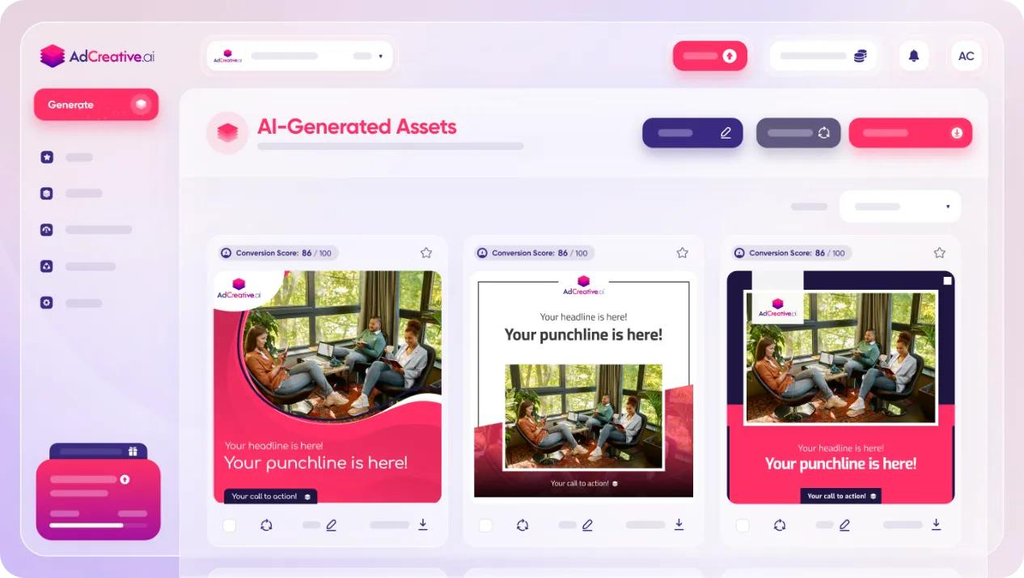
Can You Really Create a Month’s Worth of Ads in 10 Minutes?
Let’s put the headline into perspective.
The purpose of using AdCreative.ai is to reduce the time spent on repetitive creative production. However, creating a complete, approved, ready-to-publish monthly advertising campaign in exactly 10 minutes is not a realistic promise for every client or project.
The initial generation process can be much faster than manually designing each asset. But planning the campaign, checking the results, making revisions, and getting client approval still take time.
Consider this hypothetical example.
A client requests 20 advertising variations for a monthly campaign.
If you spend approximately 20 minutes manually designing each variation, the total design time would be:
20 designs × 20 minutes = 400 minutes (6 hours and 40 minutes).
Now imagine using an AI tool to generate initial design options. Instead of building each creative from a blank page, you can review the generated options, select suitable designs, and concentrate your effort on editing and quality control.
The actual time saved will depend on the project and how much editing is necessary. The important difference is that you’re no longer required to perform every repetitive design step manually.
For freelancers managing multiple clients, even reducing some of that repetitive work can make the production process easier to manage.
How Freelancers Can Use This Workflow for Different Clients
AdCreative.ai isn’t limited to one type of business. Freelancers can adapt the same basic process to different industries and campaign objectives.
1. E-Commerce Businesses
Online stores regularly promote products, discounts, seasonal collections, and new arrivals.
A freelancer can use AI-generated creative options to explore different ways of presenting the same product.
For example, a clothing store might need:
- New collection advertisements.
- Product-specific promotional designs.
- Seasonal sale graphics.
- Discount announcements.
- Different creative versions for testing.
Instead of designing every variation independently, you can generate initial options and customise the most relevant ones.
2. Small Businesses
Small businesses often need promotional content but may not have an in-house designer.
Freelancers can use AI-assisted creative production to prepare advertising concepts for restaurants, salons, local stores, service providers, and other businesses.
For example, a restaurant may need advertisements promoting a new menu, special offers, weekend deals, and seasonal products.
The freelancer can use the same workflow to generate different creative directions and then adjust them to match the restaurant’s branding.
3. Social Media Marketing Agencies
Agencies frequently handle multiple brands simultaneously.
The challenge is not just creating one good advertisement. It’s maintaining a consistent production process while managing different clients and their requirements.
An AI-powered platform can help teams generate initial concepts, explore creative variations, and reduce repetitive work.
However, each client’s brand guidelines and campaign objectives should remain separate. Reusing a generic design without checking whether it fits the brand can make the final work look unprofessional.
Why Multiple Ad Variations Matter
Producing different versions of an advertisement is useful because the first creative idea isn’t necessarily the one that resonates most with the target audience.
For example, an online store selling wireless headphones could test different advertising angles:
Product-focused angle: Highlight the product’s design and features.
Problem-focused angle: Focus on a common inconvenience the product is intended to address.
Lifestyle angle: Present the headphones in a relevant everyday setting.
Offer-focused angle: Highlight a genuine discount or promotional offer.
These are different creative approaches for the same product.
Generating several versions gives the advertiser more options to evaluate. The actual performance of each advertisement still needs to be measured through campaign data.
AI-generated designs can help with production, but they cannot guarantee that an advertisement will generate sales or outperform another version.
Where AdCreative.ai Fits Into Your Existing Freelance Workflow
You don’t necessarily need to abandon your existing design tools.
A practical approach is to use different tools for different tasks.
| Task | Possible approach |
|---|---|
| Initial ad concepts | AdCreative.ai |
| Generating creative variations | AdCreative.ai |
| Exploring headline ideas | AdCreative.ai |
| Detailed manual adjustments | Your preferred design editor |
| Client feedback | Your existing communication process |
| Campaign performance tracking | Advertising platform analytics |
For example, you could use AdCreative.ai to generate several initial designs, select the most relevant options, and then make additional adjustments in your preferred editor.
This gives you flexibility without forcing you to change your entire workflow.
Try AdCreative.ai With Signup Credits and Explore the Google Ads Promotion
If you regularly create advertising creatives for clients, testing an AI-powered platform can help you understand whether it fits your production process.
AdCreative.ai offers a promotional free-trial option. The signup offer referenced in this article includes 20 credits and a 7-day free trial. Promotional details can change, so check the credits and trial terms displayed on the registration page before signing up.
There is also a Google Ads promotional credit offer of up to $500 for eligible advertisers. Importantly, the amount is tied to qualifying advertising spend rather than being a guaranteed $500 reward for simply creating an account.
Sign up using the button below to explore AdCreative.ai with the available signup credits and free-trial offer. Eligible advertisers may also receive up to $500 in Google Ads promotional credit, depending on their qualifying ad spend and the applicable terms.
The Google Ads credit is subject to eligibility, qualifying spend, location, and promotional terms. Review the conditions before spending money on advertising.
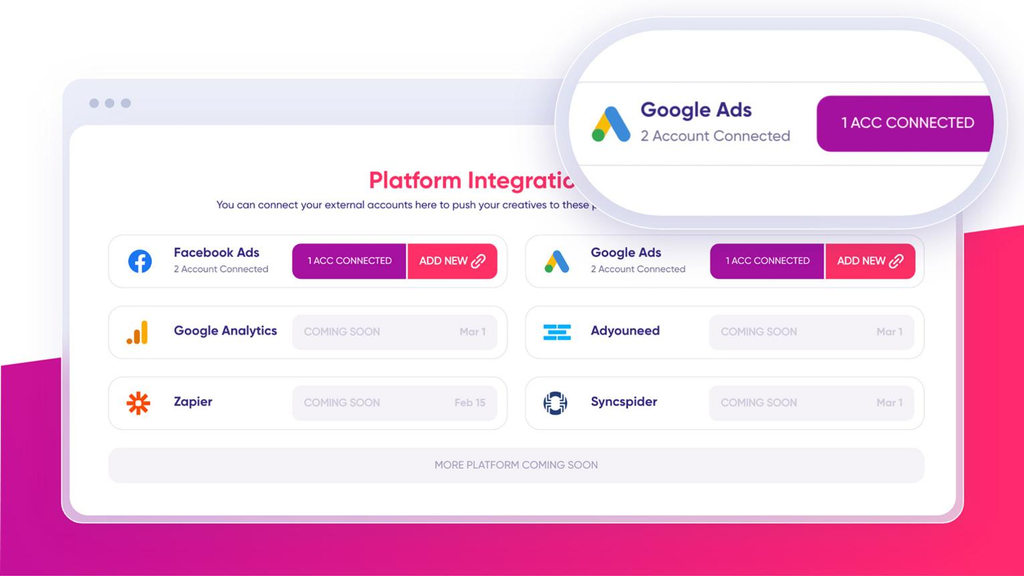
How to Claim Up to $500 in Google Ads Credit Through AdCreative.ai
The Google Ads promotion is another detail worth understanding before signing up.
AdCreative.ai’s help documentation explains a promotional credit offer for eligible Google Ads accounts. Under the described offer, the credit is linked to the amount spent on qualifying advertising, up to a maximum of $500.
This means you should not assume that every new user automatically receives $500.
Step 1: Check Your Eligibility
Before creating an advertising campaign, review the current promotional conditions.
According to AdCreative.ai’s published instructions, an advertiser can create a new Google Ads account or use an existing account if it has had no advertising spend during the previous six months.
Eligibility can depend on your location and the specific promotion available to your account.
Step 2: Set Up Your Google Ads Account
If you qualify, create a Google Ads account or use an eligible existing account.
Follow Google’s account setup instructions and make sure the account is configured correctly before connecting it to AdCreative.ai.
Step 3: Connect Google Ads to AdCreative.ai
Follow the account integration instructions provided by AdCreative.ai.
Once connected, you can use the advertising tools available in your account to work with your campaigns.
Step 4: Make the Qualifying Advertising Spend
The published promotion describes a matching-credit structure.
For example, if you spend $100 in qualifying advertising costs, the promotional credit may match that amount. If you spend $500 or more, the maximum promotional credit described is $500.
These are illustrative examples of the advertised matching structure, not a guarantee that every account will qualify.
Step 5: Check When the Credit Is Applied
According to AdCreative.ai’s instructions, the credit is applied after the qualifying initial payment, generally in the following month.
Google Ads promotional offers can have their own qualification and processing periods. Google also explains that promotional credits are subject to the terms of the particular offer and are not cash refunds.
Important: Check the promotion displayed in your account before committing to any advertising spend. Do not spend money solely because you expect to receive a credit. Confirm your eligibility, qualifying amount, deadlines, and applicable conditions first.
Is AdCreative.ai Worth Trying for Freelancers?
If your work involves producing multiple advertising creatives, AdCreative.ai is worth exploring as a possible addition to your workflow.
Its main appeal is the ability to generate creative options and advertising text without manually building every initial design.
It may be particularly useful if you:
- Manage social media advertising for multiple clients.
- Regularly create product advertisements.
- Need different creative versions for campaigns.
- Spend considerable time producing repetitive designs.
- Want to explore AI-assisted advertising production.
However, it isn’t a replacement for understanding advertising strategy, brand positioning, or audience behaviour.
You still need to know what makes an advertisement relevant to the audience, whether its message is accurate, and whether its design communicates the intended offer.
The best approach is to treat AI as a production assistant, not as a substitute for professional judgment.
Frequently Asked Questions
1. Can AdCreative.ai create multiple advertising designs?
Yes. AdCreative.ai can generate different advertising creative options based on the information and settings you provide. The available formats and features depend on your plan.
2. Is AdCreative.ai useful for freelance social media managers?
It can be useful for freelancers who regularly create advertisements for different businesses. It can help generate initial design options and reduce some repetitive creative-production tasks.
3. Does AdCreative.ai guarantee better advertising results?
No. AI-generated creatives do not guarantee higher conversions, sales, or return on advertising spend. Campaign performance depends on several factors, including the product, audience, offer, targeting, and advertising strategy.
4. How many free credits are included in the signup offer?
The promotional offer referenced in this article includes 20 signup credits and a 7-day free trial. However, promotional offers can change. Check the registration page for the exact number of credits and current trial conditions.
5. Can I receive the full $500 Google Ads credit just by signing up?
No. The Google Ads promotion is linked to qualifying advertising spend and eligibility requirements. The maximum advertised credit is up to $500, not an unconditional signup bonus.
6. Do I need design experience to use AdCreative.ai?
You don’t necessarily need advanced graphic-design skills to generate initial creatives. However, understanding basic design principles and advertising copy can help you review, customise, and improve the results.
7. Can I use AdCreative.ai for e-commerce advertisements?
Yes. The platform offers tools for creating advertising creatives and product-focused visual assets, making it relevant to e-commerce businesses and marketers.
Final Thoughts
Creating advertising creatives for several clients can become repetitive, particularly when every campaign requires multiple designs, headlines, and formats.
AI-powered platforms such as AdCreative.ai offer a way to simplify part of that process. You can generate initial creative options, review the results, and spend more of your time on campaign planning, client communication, and quality control.
The goal isn’t to eliminate the work involved in advertising. It’s to reduce the time spent on repetitive production tasks so you can manage your workload more efficiently.
If you want to see whether the platform fits your freelance workflow, explore the current free-trial offer and signup credits. You can also review the Google Ads promotion, which may provide up to $500 in credit based on qualifying advertising spend and eligibility.
Remember: signup credits and the Google Ads promotional credit are separate offers. The Google Ads credit is subject to qualifying spend, eligibility, and the terms shown for your account.